


- Protocols

- Articles and Issues
- For Authors
- About
- Become a Reviewer


Computational Approach for the Reliable Inference of Task States Encoded by Neurons Using Calcium Imaging

Published: Vol 16, Iss 21, Nov 5, 2026 DOI: 10.21769/BioProtoc.5867 Views: 23
Reviewed by: Migla MiskinyteAnik TuladharAnonymous reviewer(s)
 PDF
PDF  Ask a question
Original research article
The authors used this protocol in:

Jan 2026

Protocol Collections
Comprehensive collections of detailed, peer-reviewed protocols focusing on specific topics



Related protocols

Abstract
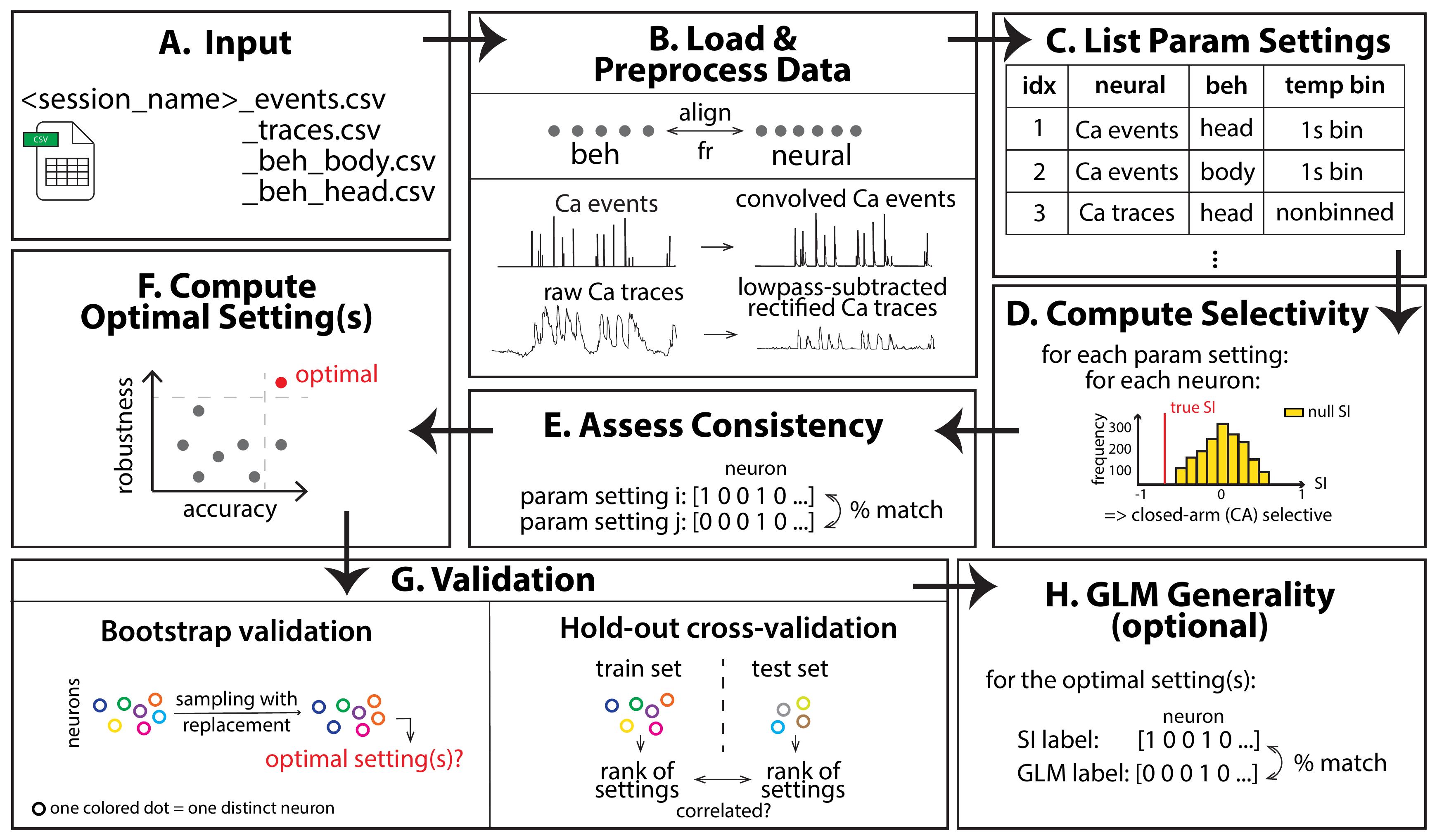
Calcium imaging has become a widely used technique for measuring the activity of identified neurons during behavior. A key goal in such investigations is to determine whether, and to what extent, neurons preferentially encode one task-relevant state over another—a property referred to as neuronal selectivity. Despite the widespread use of calcium imaging for this purpose, no consensus exists on the parameter choices required to assess neuronal selectivity reliably: choices regarding neural data representation, behavioral position tracking, temporal binning, data balancing, and statistical shuffling all vary substantially across published studies. We recently developed a systematic computational approach to address this gap. Here, we describe the step-by-step protocol for implementing this computational pipeline. Starting from preprocessed calcium imaging data, the protocol guides users through all stages of the analysis: loading and aligning neural and behavioral data, deriving four metrics of neural activity, computing a selectivity index (SI), generating null distributions using four shuffling strategies, and assigning selectivity labels to individual neurons. The protocol introduces a principled, data-driven framework for evaluating the quality of any combination of parameter choices using quantitative metrics of accuracy and robustness and for identifying the optimal combination. The framework is validated using bootstrap resampling and hold-out cross-validation, and its generality is demonstrated by application to a different, regression-based approach for assessing selectivity of individual neurons. Finally, we describe the natural extension of this framework to inferences about task states encoded by populations of neurons. Thus, our protocol provides a reusable, extensible approach to identify optimal parameter settings for reliably characterizing neural encoding of two discrete task states.
Key features
• Provides a step-by-step computational pipeline for assessing the selectivity of neurons to task states from calcium imaging data.
• Introduces quantitative accuracy and robustness metrics for objectively evaluating and comparing the quality of any combination of analysis parameter choices.
• Validates the optimal parameter choices in terms of reliability, generalizability, and generality using bootstrap resampling, hold-out cross-validation, and a regression-based (GLM) approach, respectively.
• Provides modular, well-documented MATLAB code covering all pipeline stages, enabling adaptation to different cell types, brain areas, calcium indicators, two-state task designs, and ensembles.
Keywords: Calcium imaging Encoding
Neuron
Selectivity
Task states
Freely behaving mice
Encoding
Neuron
Selectivity
Task states
Freely behaving mice
Graphical overview
Background
Understanding the neural representations underlying distinct behavioral states is a central goal of systems and behavioral neuroscience. A key question is whether, and to what extent, individual neurons in a brain area preferentially encode one task-relevant state over another. Such investigations have been conducted across a wide range of behavioral contexts, including spatial navigation in safe versus aversive zones [1–4], working memory and decision making [5–7], social interactions [8–10], and fear learning [11]. In each case, the encoding preference of individual neurons is quantified by comparing their responses across task-relevant states and classifying neurons as selective or non-selective based on statistical testing.
Calcium imaging, or the imaging of intracellular neural calcium dynamics using genetically encoded calcium indicators (GECIs) such as GCaMP6f, has emerged as a popular method for such investigations, owing to its ability to access simultaneously large numbers of identified neurons, including targeted cell-type or projection-specific subpopulations, even in freely behaving animals [12–13]. However, unlike electrophysiological recordings that directly measure action potentials, calcium signals reflect a convolution of underlying spiking activity with the slow rise and decay kinetics of the calcium indicator [14–15]. This introduces inherent ambiguity in the choice of metric used to quantify neural activity and raises the question of whether continuous fluorescence traces [3,11,16], discrete detected calcium events [2], or convolved representations of those events provide the most reliable basis for inferring neuronal selectivity. This indirect relationship also causes calcium imaging to under-sample sparsely firing neurons [17–18], which may yield too few detectable events to support a reliable activity estimate; the number of events recovered depends further on signal quality and on the event-detection parameters chosen during preprocessing. These dependencies motivate the minimum event-count criterion applied in step B3, which should be re-examined whenever acquisition or preprocessing settings change.
Beyond the choice of neural data representation, studies have also varied in a number of other procedural and analytical choices: whether the animal's position is tracked using a head-centroid [9] or body-centroid [2,19–20] coordinate; whether neural and behavioral data are temporally binned beyond the acquisition frame rate [2,11]; whether the number of data samples from each task state is matched to control for unequal occupancy; and which statistical shuffling method is used to generate null distributions [2–3,5–9,20]. These choices span the full data processing and analysis pipeline and are made routinely across laboratories, often without systematic justification.
Our recent study [21] highlighted the absence of systematic investigation of the effects of diverse parameter choices and introduced an objective framework for evaluating the quality of inference of neural encoding preferences as a function of parameter choice. Using this approach, it revealed that there is substantial inconsistency in inferences across different choices of parameter values along this pipeline. Specifically, applying 120 different combinations of these parameter values to a single calcium imaging dataset produced markedly different selectivity labels for the same neurons, with 96.8% of all pairs of parameter combinations agreeing on fewer than 90% of neurons. Because these divergent outcomes arise from the same underlying recordings, they isolate the effect of the analysis choices themselves. The current protocol paper describes the step-by-step computational pipeline introduced in that study, implemented in MATLAB. It covers all stages, from preprocessed calcium imaging data to the characterization of individual neuronal selectivity. Critically, it implements a data-driven framework for systematically comparing the quality of different parameter combinations using quantitative metrics of accuracy and robustness and for identifying the combination that produces the most reliable inferences. The pipeline was developed and validated using calcium imaging of excitatory (CaMKII+) neurons in the medial prefrontal cortex (mPFC) of freely behaving mice navigating the elevated zero maze (EZM) [22], but is designed to be applicable to data obtained using any calcium indicator, in any brain area, with either 1-photon or multiphoton microscopy, in any animal species, and during any behavioral or stimulus presentation experiment. In other words, this protocol is applicable to any calcium imaging dataset obtained in which the goal is to infer the encoding of two discrete task states by individual neurons (as well as by neural populations).
Software and datasets
| Type | Software/dataset/resource | Version | Date | License | Access |
| Software 1 | MATLAB | R2021b or later * | 2021 | Commercial | Paid (academic license available) |
| Software 2 | Inscopix Data Preprocessing Software (IDPS) (for data preparation only; output is input to this protocol)* | 1.6 or later | 2020 | Commercial | Paid |
| *The protocol does not require this particular software. Outputs from other (open-source or custom) software for preprocessing calcium imaging data and identifying individual cells, such as CaImAn or Suite2p [23–24], can be swapped in after appropriate formatting to dovetail with our code. | |||||
| Software 3 | EthoVision (Noldus Inc.) (for behavioral tracking only; output is input to this protocol)* | v11.5 | 2020 | Commercial | Paid |
| *EthoVision is not required; outputs from other (open-source) video processing or pose-estimation software, such as DeepLabCut [25], after appropriate formatting to dovetail with our code, can be used instead. | |||||
| MATLAB Toolbox 1 | Statistics and Machine Learning Toolbox (required) | 25.2 (R2025b) tested* | \ | Bundled with MATLAB | Paid (with MATLAB) |
| MATLAB Toolbox 2 | Signal Processing Toolbox (required for ca_traces neural data type only) | 25.2 (R2025b) tested* | \ | Bundled with MATLAB | Paid (with MATLAB) |
| MATLAB Toolbox 3 | Parallel Computing Toolbox (optional; strongly recommended) | 25.2 (R2025b) tested* | \ | Bundled with MATLAB | Paid (with MATLAB) |
| Code | https://doi.org/10.5281/zenodo.20046106 | v3 | 18/08/2026 | CC BY | Free |
| *MathWorks distributes these toolboxes as versioned components of each MATLAB release rather than as independently versioned products, so the toolbox version is determined by the MATLAB release. The pipeline was verified to run end to end on MATLAB R2025b with Statistics and Machine Learning Toolbox 25.2, Signal Processing Toolbox 25.2, and Parallel Computing Toolbox 25.2. It calls only long-standing core functions (readmatrix, interp1, butter, filtfilt, movmean, conv2, trapz, prctile, corr, robustfit, tiedrank, glmfit, and parfor), all of which are available with unchanged interfaces in R2021b, the stated minimum release. | |||||
Procedure
A. Configuration and data preparation
This section describes how to configure the pipeline and prepare input data files before running any analysis (Table 1).
Table 1. Pipeline stages, the scripts executed at each stage, the files consumed and produced, and the action required of the user. Only config.m requires editing for a standard run; every other script is called automatically by run_full_pipeline.m via run_pipeline_stages.m and should not need modification. Stage numbers (Stages 1–8) refer to the eight stages into which run_pipeline_stages.m divides an automated run, announced in the MATLAB Command Window as each one starts; they are distinct from the lettered sections (A–I) of this procedure.
| Stage | Scripts executed | Input | Output | User action |
|---|---|---|---|---|
| A. Configuration and data preparation | config.m | — | Configured cfg struct | Edit required: session names, frame rates, data folder |
| A. Input files (user-supplied) | — | — | Up to four CSV files per session: <session> | User-supplied; see steps A2–3 for format |
| B. Data loading, alignment, and preprocessing (Stage 1 in codebase) | load_data.m | CSV files per session | results/analysis/session_data_all.mat | None |
| C. Enumeration of parameter settings (Stage 2) | enumerate_parameter_settings.m, export_parameter_settings_table.m | Parameter levels defined in config.m | results/analysis/parameter_settings.mat and .xlsx | None |
| D. SI computation and label assignment (Stage 2) | compute_all_settings.m | session_data_all.mat, parameter_settings.mat | results/SI/<setting_idx> | None; cached per-setting results are reused only when the configuration fingerprint still matches (see the Critical note in section D below) |
| E. Label consistency analysis (Stage 3) | compute_label_consistency.m | parameter_settings.mat, results/SI/*.mat | results/analysis/label_table.mat, consistency_table.mat | None |
| F. Template neurons, accuracy, and robustness (Stage 4) | identify_template_neurons.m, compute_accuracy_robustness.m, identify_optimal_settings.m | session_data_all.mat, parameter_settings.mat, label_table.mat, consistency_table.mat | results/analysis/template_info.mat, template_selection.mat (interactive review only), accuracy_robustness_table.mat, optimal_settings.mat | Interactive by default: confirm template neurons in the GUI (step F2); set cfg.template_review = “auto” or “replay” to run unattended |
| G. Validation (Stages 5–6) | run_bootstrap_validation.m, run_crossvalidation.m | parameter_settings.mat, label_table.mat, template_info.mat | results/analysis/bootstrap_results.mat, cv_results.mat | None |
| H. GLM generality analysis (Stage 7) | run_GLM_analysis.m | session_data_all.mat, parameter_settings.mat, optimal_settings.mat, label_table.mat | results/GLM/glm_setting<idx> | Optional: set cfg.run_glm_analysis = false to skip |
| I. Result visualization (Stage 8) | result_interpretation.m | Results of sections C and E–H, passed in memory | results/figures/*.png | None |
1. Edit config.m to match your dataset. The configuration file controls all pipeline parameters. At minimum, edit the following fields:
a. Set cfg.data_folder to the absolute path of the folder containing your CSV input files (default: <project_root>
b. Edit cfg.sessions to list all recording sessions. For each session, provide: name (string prefix shared by all four CSV files for that session), frame_rate (neural imaging frame rate in Hz), and behav_rate (behavioral camera frame rate in Hz).
Note: If any recording session was acquired at a different frame rate, set frame_rate accordingly for that session entry. The pipeline handles variable frame rates per session without any other code change. Sessions are never resampled to a common rate: each is loaded, preprocessed, and analyzed at its own native frame rate, and neurons are pooled across sessions only afterward, once the per-session SI values have been computed. (The separate, within-session question of the behavioral camera running at a different rate from the imaging is handled in step B2.) Everything downstream that is defined in physical time is derived from that session's own frame_rate, so that it denotes the same duration at any acquisition rate: the 1 s bin width in bin_data.m becomes round(frame_rate) frames, the exponential kernels in smooth_ca_events.m span filtSpread seconds' worth of samples, and the 2–4 s event-chunk durations used by the events-chunking shuffling methods are converted to the corresponding number of samples in build_ecm_chunk_table.m. One consequence is worth noting. Under “native” binning, each session keeps its own sampling interval, so a bout of a given duration yields twice as many samples in a 20 Hz session as in a 10 Hz one. This does not bias the SI, which is a normalized ratio in which the frame-rate factor cancels, and it does not mix data across sessions, since each neuron's SI is computed from its own session alone and only neurons are pooled afterward. It does mean that neurons from different sessions are not equally resolved in time: the area-under-the-curve integration used for the continuous data types is coarser at the lower rate, and events are localized less precisely. Selecting the “1s” binning level places all sessions on a common one-second time base, although each bin remains an average over that session's own number of native samples.
c. Adjust cfg.min_num_events if a different minimum event count is desired (default: 10).
d. Set cfg.use_parallel = true to enable parallelization via MATLAB's Parallel Computing Toolbox (strongly recommended for datasets of ~100 or more neurons).
e. Set cfg.run_glm_analysis = false to skip the optional GLM analysis module (section H).
f. Set cfg.template_review to control how template neuron candidates are confirmed in section F: 'interactive' (default) opens the review figures, 'replay' re-applies a previously saved selection, and 'auto' accepts all candidates without prompting (step F2).
g. Set cfg.random_seed to fix every stochastic stage of the pipeline (default: 42). Each stage derives its random stream from this seed keyed on the unit of work it is processing, so results do not depend on cfg.use_parallel, on the number of parallel workers, or on whether an interrupted run was resumed. Set it to [] for non-deterministic behavior.
2. Prepare the neural data CSV files. Two CSV files are required per session (Figure 1A):
a. Ca2+ events file (<session_name>
b. Ca2+ traces file (<session_name>
Critical: Both CSV files are direct outputs of the Inscopix Data Preprocessing Software (IDPS) and require no further preprocessing. The events threshold factor and smallest decay time used in IDPS (values of 4 and 0.2, respectively, were used in the original study) do not need to be specified in config.m. Users of other preprocessing tools (e.g., CaImAn or Suite2p) must format their outputs to the following specification, which load_data.m assumes without checking:
(i) Both files are read with MATLAB's readmatrix and must contain exactly one header row; neural files use neuron identifiers as headers (e.g., C001, C002, …), behavioral files use a single header.
(ii) There is no timestamp or index column; rows are imaging frames in acquisition order, and frame timing is derived entirely from frame_rate in config.m.
(iii) The events and traces files must have identical dimensions [T × N], and their columns must be in the same neuron order, because a neuron is identified by its column index throughout the pipeline.
(iv) In the events file, entries must be 0 where no event was detected and a positive amplitude where one was; any non-zero entry counts as an event for the minimum-event criterion (step B3) and for building event chunks, while the amplitude itself is used when computing activity. No rescaling is required: supply amplitudes in whatever units your preprocessing tool reports. Convolution with the exponential kernels is linear in the amplitudes, and the SI is a per-neuron ratio, so multiplying every amplitude by a positive constant scales ca_events, ca_convolved_2s, and ca_convolved_4s by that constant and leaves every SI value unchanged.
(v) In the traces file, values are the continuous fluorescence time course of each neuron (ΔF/F or the equivalent quantity your software exports). No rescaling is required here either. process_traces.m subtracts a low-pass-filtered drift estimate before rectifying, and since a low-pass filter passes a constant through unchanged, that subtraction also removes any additive offset, including a per-neuron mean. Percent or fractional ΔF/F, raw or mean-centered, non-normalized or z-scored per neuron, therefore, all give identical SI values. A nonlinear transformation is not harmless, however: do not rectify, clip, or take the absolute value of the traces beforehand, because rectification must follow the subtraction of the drift rather than precede it. Two further requirements apply. Traces must contain no non-finite values. IDPS writes nan into a trace for every dropped frame, and filtfilt rejects non-finite input, so such a file stops the pipeline with an error rather than yielding a wrong result; fill or interpolate dropped frames before running. Finally, traces must be long enough (≥9 frames) for zero-phase filtering; process_traces.m warns and returns the raw traces unchanged for sessions shorter than the filter requires.
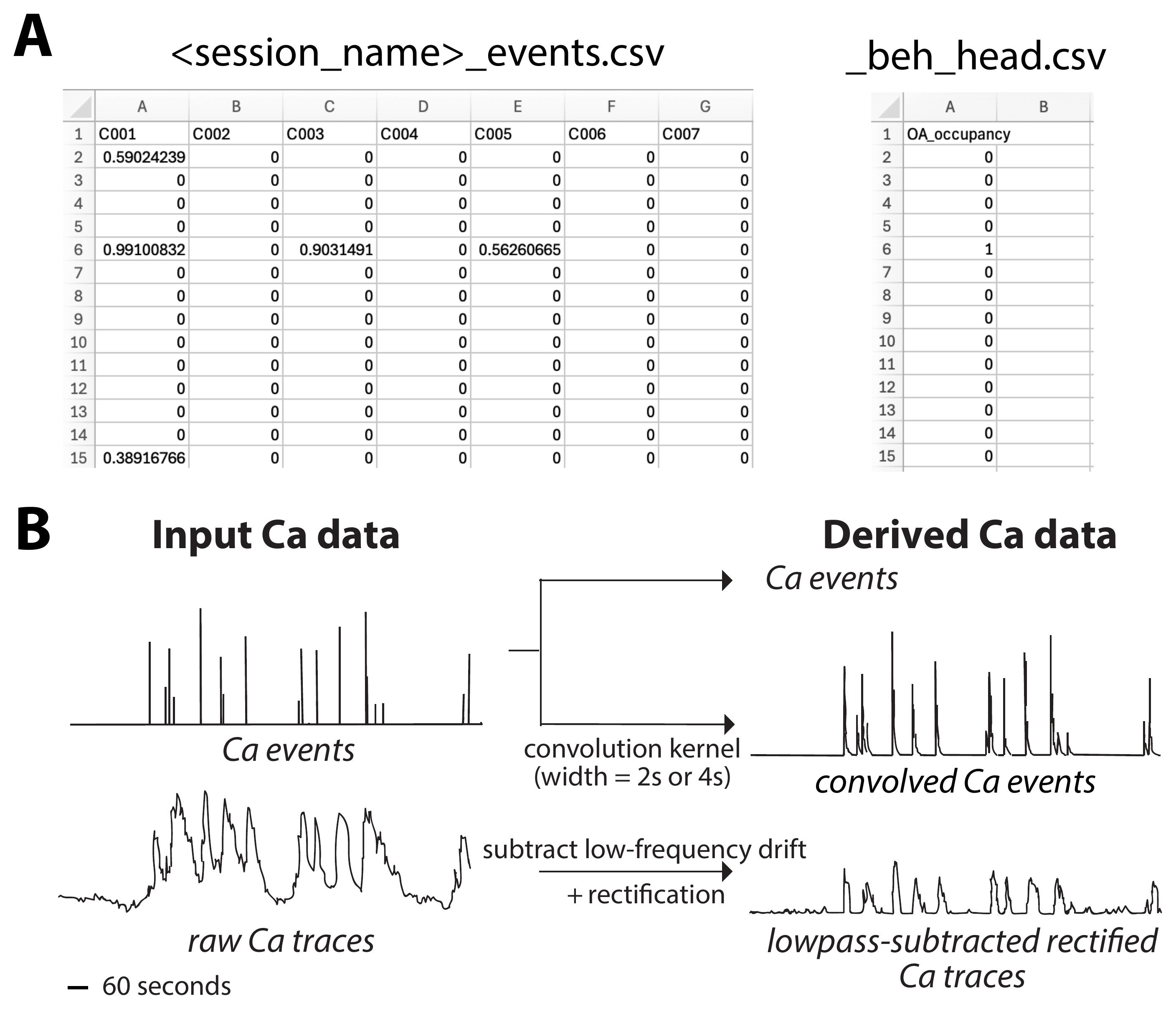
Figure 1. Input data formats and derived neural data representations. (A) Representative CSV file formats for a single recording session. Left: Ca2+ events file (<session_name>
3. Prepare the behavioral tracking data CSV files. Up to two CSV files are required per session (Figure 1A):
a. Body-centroid behavioral file (<session_name>
b. Head-centroid behavioral file [9] (<session_name>
Notes:
1. At least one of the two behavioral files must be present for each session. If only one is available, load_data.m mirrors it to the other slot and prints a warning indicating which analysis branch will be unavailable.
2. The behavioral files must contain precomputed binary arm-occupancy labels (derived from EthoVision or an equivalent behavioral tracking system), not raw x/y coordinates. The pipeline does not perform zone detection internally.
3. The original study used binary-arm occupancy as the behavioral label, but in principle, any binary behavioral variable is acceptable.
4. Verify the file naming convention. All four CSV files for a given session must share the prefix specified in cfg.sessions(s).name. For example, a session named session_01 requires: session_01_events.csv, session_01_traces.csv, session_01_beh_body.csv, session_01_beh_head.csv.
B. Data loading, alignment, and neural data preprocessing
All steps in this section are implemented in load_data.m, which is called automatically by the master script run_full_pipeline.m during Stage 1.
1. Load neural and behavioral CSV files. load_data.m reads the four CSV files for each session using MATLAB's readmatrix function. Neural and behavioral data are stored separately before alignment.
2. Resample behavioral data to the neural imaging frame rate. The behavioral tracking data (recorded at behav_rate Hz, e.g., 18.96 Hz) are resampled to the neural imaging frame rate (frame_rate Hz, e.g., 20 Hz) using nearest-neighbor interpolation. This preserves the binary (0/1) nature of the arm-occupancy labels exactly, introducing no fractional values. Resampling is performed internally by load_data.m using interp1(..., 'nearest').
Note: It is important that the calcium imaging data and the behavioral tracking data input into the code be perfectly aligned in time. Resampling, above, corrects only for the difference in frame rates, not for misalignment in start time: load_data.m builds both time vectors starting at t = 0, so it assumes that frame 1 of the neural file and frame 1 of the behavioral file were acquired at the same moment. In our experiments, we utilized a TTL-triggered simultaneous start for data acquisition: an Arduino-generated digital pulse sent to both the calcium imaging system and the behavioral tracking system to ensure that the two data streams begin at the same time. TTL synchronization is not required, but some means of establishing a common t = 0 is. If the acquisition systems being employed cannot be hardware-triggered together, the two streams will need to be aligned before running the pipeline: for example, by recording a shared, unambiguous marker visible to both systems (such as an LED flash within the behavioral camera's field of view coincident with an identifiable frame in the imaging data), or by trimming both files to a common start event. We add here, since it bears on how a user should check their own alignment, that a constant offset shifts the assignment of neural samples to task states identically for the true and the shuffled data, so it inflates neither the true SI nor the null distribution relative to the other and will not be revealed by the significance test; alignment has to be established at acquisition or verified directly, and cannot be diagnosed from the pipeline's output.
3. Exclude low-event neurons. Neurons with fewer than cfg.min_num_events (default: 10) detected Ca2+ events across the entire session are excluded from all analyses. The criterion is applied by load_data.m to the number of imaging frames with a non-zero event amplitude, and the indices of accepted neurons are stored in session_data.valid_cell_idx. This threshold represents a practical lower bound for reliable estimation of state-selective activity.
Critical: A neuron contributing only a handful of events yields an SI estimated from very few samples and a correspondingly unstable null distribution. The default of 10 was the value used in the original study [21], in which sessions lasted 20 min—equivalent to a minimum rate of 0.5 events/min, which we recommend as the general criterion. cfg.min_num_events is an absolute count, not a rate, and is therefore not automatically transferable to datasets with different session durations. Before adopting it, users must rescale it to preserve the same minimum event rate for their own session length (0.5 × session duration in minutes): for sessions substantially longer than 20 min, the absolute count should be raised proportionally, and for shorter sessions lowered. This rate is deliberately conservative: it errs toward excluding marginal neurons rather than admitting SI estimates the data cannot support. The imaging frame rate does not enter the count as a scaling factor, since events are counted per session rather than per frame, but it does bound how finely closely spaced events can be resolved: when the frame interval approaches the smallest decay time used during detection (0.2 s, or 5 Hz, in our case), consecutive events, particularly in neurons that fire in bursts, can merge into a single prolonged transient and be detected as one event, so counts are biased downward, and each event is localized with less temporal precision. A low frame rate depresses event counts, acting like a sparse indicator, a quiescent preparation, or conservative event-detection settings. All of them can make the fixed rate criterion more conservative, potentially causing neurons with adequate activity to be excluded, thereby producing a loss of sensitivity rather than being a source of false positives. Where this is a concern, users should inspect the distribution of per-neuron event counts and only lower the threshold if it is excluding neurons with visibly reliable event trains, accepting that the resulting SI values will be noisier.
4. Derive the four neural data types. Starting from the raw Ca2+ events and traces for accepted neurons, load_data.m derives all four neural data representations used in the parameter sweep (Figure 1B):
a. Raw Ca2+ events (ca_events): The discrete event amplitude matrix directly from the events CSV file. No transformation applied.
b. Rectified low-pass-subtracted Ca2+ traces (ca_traces): Derived via process_traces.m. A second-order Butterworth low-pass filter with a cutoff frequency of 0.1 Hz is applied to the raw ΔF/F trace of each neuron using zero-phase filtering (filtfilt). The slow drift component is subtracted from the original trace, and the result is rectified by setting all negative values to zero. Requires the MATLAB Signal Processing Toolbox.
c. 2s-convolved Ca2+ events (ca_convolved_2s): Derived via smooth_ca_events.m with filtSpread = 2. The raw Ca2+ events time course is convolved with an exponential decay kernel of effective spread 2 seconds, mimicking the fast decay kinetics of GCaMP6f.
d. 4s-convolved Ca2+ events (ca_convolved_4s): Derived identically as above with filtSpread = 4.
Note: The convolution kernel in smooth_ca_events.m is an exponential decay, exp(-expFiltFac · t), with expFiltFac = 6/filtSpread evaluated at the native time resolution of the data. The kernel therefore falls to e-6 (approximately 0.25%) of its peak over filtSpread seconds: filtSpread is the full decay duration of the kernel, and the kernel's decay time constant is filtSpread/6. The values used here, filtSpread = 2 and 4 s, were chosen in the original study [21] to approximate the decay of a Ca2+ transient under faster and slower GCaMP6 kinetics (GCaMP6f versus GCaMP6s); with the parameterization above, they correspond to kernel decay time constants of 0.33 and 0.67 s. To adapt the pipeline to another indicator, the user should set filtSpread to the full decay duration of that indicator's transients in their own recordings, or scale the values above by the ratio of that indicator's decay kinetics to those of GCaMP6f; published half-decay times are available for jGCaMP7f [26] and for the jGCaMP8 family [27]. For example, an indicator whose transients decay approximately twice as fast as GCaMP6f in your preparation would call for filtSpread values of approximately 1 and 2 s. Reported decay times vary substantially with the measurement conditions (single action potentials versus spike trains, in vitro versus in vivo, and the imaging modality), so values taken from the literature should be checked against the decay actually observed in the user's own data. Because the two convolved data types exist precisely to test the sensitivity of the results to this choice, we recommend retaining two levels that bracket the plausible range for the user's indicator rather than committing to a single value. The filtSpread values are set in load_data.m. Note also that the event-chunk durations used by the partial_ecm shuffling method are tied to the same time scales (2 s for ca_convolved_2s, 4 s for ca_convolved_4s, and 3 s for ca_events and ca_traces, set in build_ecm_chunk_table.m) and should be adjusted consistently.
5. Outputs of section B. load_data.m returns a session_data_all struct array (one element per session) containing: ca_events, ca_convolved_2s, ca_convolved_4s, ca_traces, beh_head, beh_body, times_open_head, times_closed_head, times_open_body, times_closed_body, and a time vector t. The struct is saved to results/analysis/session_data_all.mat.
C. Enumeration of parameter settings
All steps in this section are implemented in enumerate_parameter_settings.m, called automatically during Stage 2.
1. Define the five-dimensional parameter space. The pipeline evaluates all valid combinations of five analysis parameters (Figure 2), each with the following levels (as specified in config.m):
a. Neural data type (cfg.neural_datatypes): ca_events, ca_convolved_2s, ca_convolved_4s, ca_traces – 4 levels.
b. Behavioral data type (cfg.behavioral_datatypes): head, body – 2 levels.
c. Temporal binning width (cfg.bin_widths): native (no additional binning; 50 ms bins at 20 Hz), 1s – 2 levels.
d. OA/CA data matching (cfg.matching_methods): non_matched, matched – 2 levels.
e. Shuffling method (cfg.shuffling_methods): randperm, circshift, partial_ecm, full_ecm – 4 levels.
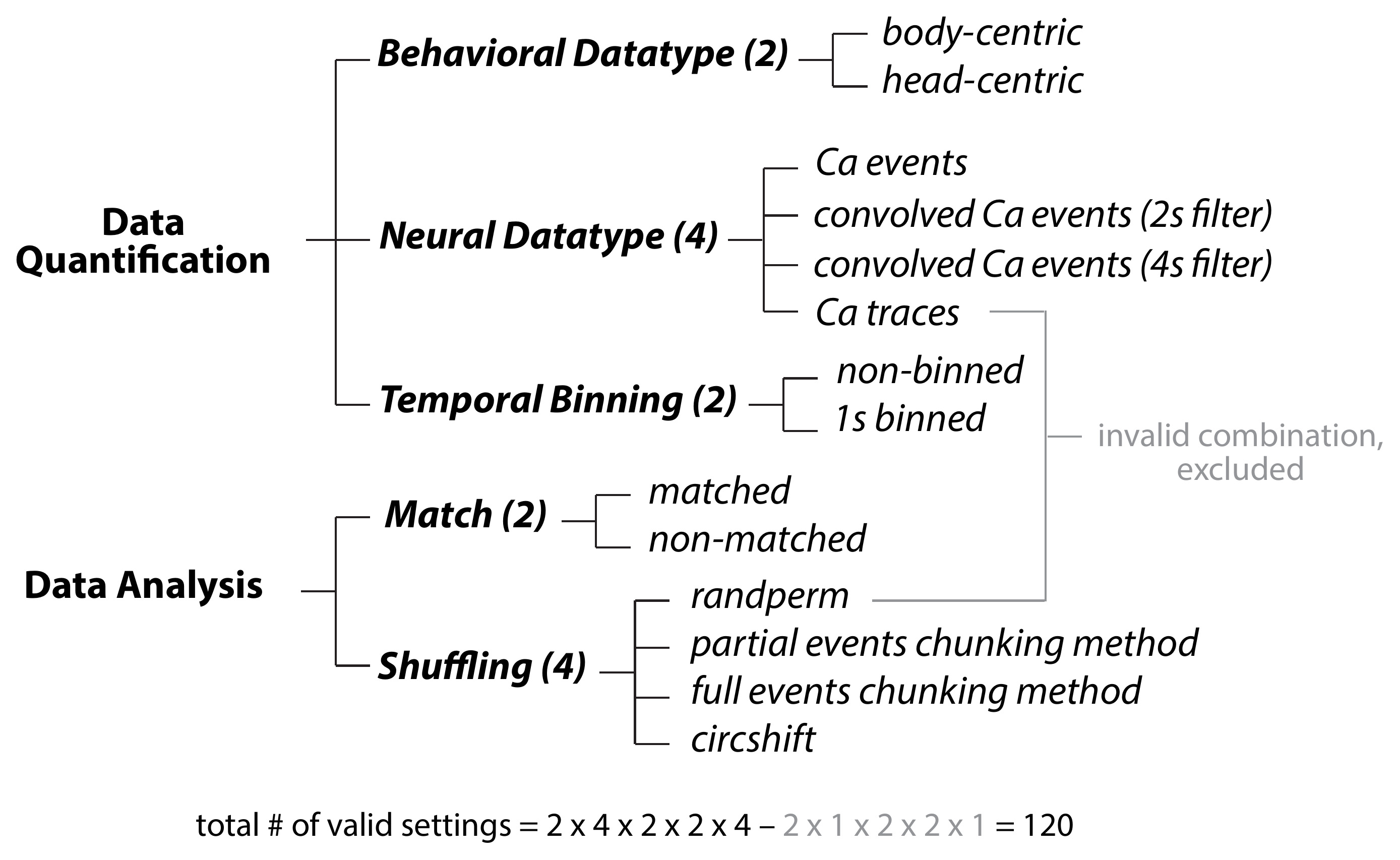
Figure 2. Key parameters. Overview of the five parameter dimensions evaluated in the computational pipeline, with the levels of each: neural data type (4 levels), behavioral data type (2), temporal binning width (2), OA/CA data matching (2), and shuffling method (4). All combinations are evaluated except those pairing ca_traces with randperm shuffling, which cannot be applied lawfully to continuous traces; the parameter space therefore comprises 4 × 2 × 2 × 2 × 4 - 8 = 120 valid parameter settings (see step C2 and Table 2).
Table 2. The 120 parameter settings, in the order in which they are enumerated along both axes of the 120 × 120 matrices in section E. The settings are those of the original study [21]: the shuffling method varies most slowly and the temporal binning width most quickly. Setting # is the position along the axes of these matrices, counting from the top-left corner. The eight combinations pairing ca_traces with randperm are excluded because randperm shuffles the underlying Ca2+ events rather than the trace itself, so the randperm block contains 24 settings, and each of the remaining three shuffling blocks contains 32. Settings #20 and #21 are the two optimal settings identified in the original study.
| Setting # | Shuffling method | OA/CA data matching | Behavioral data type | Neural data type | Temporal binning width |
|---|---|---|---|---|---|
| 1 | randperm | matched | body-centroid | ca_events | native |
| 2 | randperm | matched | body-centroid | ca_events | 1 s |
| 3 | randperm | matched | body-centroid | ca_convolved_2s | native |
| 4 | randperm | matched | body-centroid | ca_convolved_2s | 1 s |
| 5 | randperm | matched | body-centroid | ca_convolved_4s | native |
| 6 | randperm | matched | body-centroid | ca_convolved_4s | 1 s |
| 7 | randperm | matched | head-centroid | ca_events | native |
| 8 | randperm | matched | head-centroid | ca_events | 1 s |
| 9 | randperm | matched | head-centroid | ca_convolved_2s | native |
| 10 | randperm | matched | head-centroid | ca_convolved_2s | 1 s |
| 11 | randperm | matched | head-centroid | ca_convolved_4s | native |
| 12 | randperm | matched | head-centroid | ca_convolved_4s | 1 s |
| 13 | randperm | non_matched | body-centroid | ca_events | native |
| 14 | randperm | non_matched | body-centroid | ca_events | 1 s |
| 15 | randperm | non_matched | body-centroid | ca_convolved_2s | native |
| 16 | randperm | non_matched | body-centroid | ca_convolved_2s | 1 s |
| 17 | randperm | non_matched | body-centroid | ca_convolved_4s | native |
| 18 | randperm | non_matched | body-centroid | ca_convolved_4s | 1 s |
| 19 | randperm | non_matched | head-centroid | ca_events | native |
| 20 | randperm | non_matched | head-centroid | ca_events | 1 s |
| 21 | randperm | non_matched | head-centroid | ca_convolved_2s | native |
| 22 | randperm | non_matched | head-centroid | ca_convolved_2s | 1 s |
| 23 | randperm | non_matched | head-centroid | ca_convolved_4s | native |
| 24 | randperm | non_matched | head-centroid | ca_convolved_4s | 1 s |
| 25 | partial_ecm | matched | body-centroid | ca_events | native |
| 26 | partial_ecm | matched | body-centroid | ca_events | 1 s |
| 27 | partial_ecm | matched | body-centroid | ca_convolved_2s | native |
| 28 | partial_ecm | matched | body-centroid | ca_convolved_2s | 1 s |
| 29 | partial_ecm | matched | body-centroid | ca_convolved_4s | native |
| 30 | partial_ecm | matched | body-centroid | ca_convolved_4s | 1 s |
| 31 | partial_ecm | matched | body-centroid | ca_traces | native |
| 32 | partial_ecm | matched | body-centroid | ca_traces | 1 s |
| 33 | partial_ecm | matched | head-centroid | ca_events | native |
| 34 | partial_ecm | matched | head-centroid | ca_events | 1 s |
| 35 | partial_ecm | matched | head-centroid | ca_convolved_2s | native |
| 36 | partial_ecm | matched | head-centroid | ca_convolved_2s | 1 s |
| 37 | partial_ecm | matched | head-centroid | ca_convolved_4s | native |
| 38 | partial_ecm | matched | head-centroid | ca_convolved_4s | 1 s |
| 39 | partial_ecm | matched | head-centroid | ca_traces | native |
| 40 | partial_ecm | matched | head-centroid | ca_traces | 1 s |
| 41 | partial_ecm | non_matched | body-centroid | ca_events | native |
| 42 | partial_ecm | non_matched | body-centroid | ca_events | 1 s |
| 43 | partial_ecm | non_matched | body-centroid | ca_convolved_2s | native |
| 44 | partial_ecm | non_matched | body-centroid | ca_convolved_2s | 1 s |
| 45 | partial_ecm | non_matched | body-centroid | ca_convolved_4s | native |
| 46 | partial_ecm | non_matched | body-centroid | ca_convolved_4s | 1 s |
| 47 | partial_ecm | non_matched | body-centroid | ca_traces | native |
| 48 | partial_ecm | non_matched | body-centroid | ca_traces | 1 s |
| 49 | partial_ecm | non_matched | head-centroid | ca_events | native |
| 50 | partial_ecm | non_matched | head-centroid | ca_events | 1 s |
| 51 | partial_ecm | non_matched | head-centroid | ca_convolved_2s | native |
| 52 | partial_ecm | non_matched | head-centroid | ca_convolved_2s | 1 s |
| 53 | partial_ecm | non_matched | head-centroid | ca_convolved_4s | native |
| 54 | partial_ecm | non_matched | head-centroid | ca_convolved_4s | 1 s |
| 55 | partial_ecm | non_matched | head-centroid | ca_traces | native |
| 56 | partial_ecm | non_matched | head-centroid | ca_traces | 1 s |
| 57 | full_ecm | matched | body-centroid | ca_events | native |
| 58 | full_ecm | matched | body-centroid | ca_events | 1 s |
| 59 | full_ecm | matched | body-centroid | ca_convolved_2s | native |
| 60 | full_ecm | matched | body-centroid | ca_convolved_2s | 1 s |
| 61 | full_ecm | matched | body-centroid | ca_convolved_4s | native |
| 62 | full_ecm | matched | body-centroid | ca_convolved_4s | 1 s |
| 63 | full_ecm | matched | body-centroid | ca_traces | native |
| 64 | full_ecm | matched | body-centroid | ca_traces | 1 s |
| 65 | full_ecm | matched | head-centroid | ca_events | native |
| 66 | full_ecm | matched | head-centroid | ca_events | 1 s |
| 67 | full_ecm | matched | head-centroid | ca_convolved_2s | native |
| 68 | full_ecm | matched | head-centroid | ca_convolved_2s | 1 s |
| 69 | full_ecm | matched | head-centroid | ca_convolved_4s | native |
| 70 | full_ecm | matched | head-centroid | ca_convolved_4s | 1 s |
| 71 | full_ecm | matched | head-centroid | ca_traces | native |
| 72 | full_ecm | matched | head-centroid | ca_traces | 1 s |
| 73 | full_ecm | non_matched | body-centroid | ca_events | native |
| 74 | full_ecm | non_matched | body-centroid | ca_events | 1 s |
| 75 | full_ecm | non_matched | body-centroid | ca_convolved_2s | native |
| 76 | full_ecm | non_matched | body-centroid | ca_convolved_2s | 1 s |
| 77 | full_ecm | non_matched | body-centroid | ca_convolved_4s | native |
| 78 | full_ecm | non_matched | body-centroid | ca_convolved_4s | 1 s |
| 79 | full_ecm | non_matched | body-centroid | ca_traces | native |
| 80 | full_ecm | non_matched | body-centroid | ca_traces | 1 s |
| 81 | full_ecm | non_matched | head-centroid | ca_events | native |
| 82 | full_ecm | non_matched | head-centroid | ca_events | 1 s |
| 83 | full_ecm | non_matched | head-centroid | ca_convolved_2s | native |
| 84 | full_ecm | non_matched | head-centroid | ca_convolved_2s | 1 s |
| 85 | full_ecm | non_matched | head-centroid | ca_convolved_4s | native |
| 86 | full_ecm | non_matched | head-centroid | ca_convolved_4s | 1 s |
| 87 | full_ecm | non_matched | head-centroid | ca_traces | native |
| 88 | full_ecm | non_matched | head-centroid | ca_traces | 1 s |
| 89 | circshift | matched | body-centroid | ca_events | native |
| 90 | circshift | matched | body-centroid | ca_events | 1 s |
| 91 | circshift | matched | body-centroid | ca_convolved_2s | native |
| 92 | circshift | matched | body-centroid | ca_convolved_2s | 1 s |
| 93 | circshift | matched | body-centroid | ca_convolved_4s | native |
| 94 | circshift | matched | body-centroid | ca_convolved_4s | 1 s |
| 95 | circshift | matched | body-centroid | ca_traces | native |
| 96 | circshift | matched | body-centroid | ca_traces | 1 s |
| 97 | circshift | matched | head-centroid | ca_events | native |
| 98 | circshift | matched | head-centroid | ca_events | 1 s |
| 99 | circshift | matched | head-centroid | ca_convolved_2s | native |
| 100 | circshift | matched | head-centroid | ca_convolved_2s | 1 s |
| 101 | circshift | matched | head-centroid | ca_convolved_4s | native |
| 102 | circshift | matched | head-centroid | ca_convolved_4s | 1 s |
| 103 | circshift | matched | head-centroid | ca_traces | native |
| 104 | circshift | matched | head-centroid | ca_traces | 1 s |
| 105 | circshift | non_matched | body-centroid | ca_events | native |
| 106 | circshift | non_matched | body-centroid | ca_events | 1 s |
| 107 | circshift | non_matched | body-centroid | ca_convolved_2s | native |
| 108 | circshift | non_matched | body-centroid | ca_convolved_2s | 1 s |
| 109 | circshift | non_matched | body-centroid | ca_convolved_4s | native |
| 110 | circshift | non_matched | body-centroid | ca_convolved_4s | 1 s |
| 111 | circshift | non_matched | body-centroid | ca_traces | native |
| 112 | circshift | non_matched | body-centroid | ca_traces | 1 s |
| 113 | circshift | non_matched | head-centroid | ca_events | native |
| 114 | circshift | non_matched | head-centroid | ca_events | 1 s |
| 115 | circshift | non_matched | head-centroid | ca_convolved_2s | native |
| 116 | circshift | non_matched | head-centroid | ca_convolved_2s | 1 s |
| 117 | circshift | non_matched | head-centroid | ca_convolved_4s | native |
| 118 | circshift | non_matched | head-centroid | ca_convolved_4s | 1 s |
| 119 | circshift | non_matched | head-centroid | ca_traces | native |
| 120 | circshift | non_matched | head-centroid | ca_traces | 1 s |
2. Exclude invalid combinations. The randperm shuffling method cannot be applied lawfully to raw Ca2+ traces (ca_traces), so enumerate_parameter_settings.m automatically excludes all combinations of ca_traces + randperm (8 combinations), yielding 120 valid parameter settings (4 × 2 × 2 × 2 × 4 - 8 = 120).
3. Export the parameter settings table. export_parameter_settings_table.m writes the full enumeration of all 120 valid parameter settings (including the levels of each parameter dimension for each setting and its index) to an Excel file in results/analysis/.
D. Selectivity index (SI) computation and label assignment
All steps in this section are implemented in compute_all_settings.m, bin_data.m, compute_SI.m, generate_null_distribution.m, and assign_selectivity_label.m, all called automatically during Stage 2. For each of the 120 valid parameter settings, steps D1–5 are executed.
Critical: Results for each setting are saved as an individual .mat file to results/SI/ as soon as that setting completes, and on restart, compute_all_settings.m checks for an existing file for each setting index and skips any setting already completed, allowing safe resumption after interruption. Each file also records a fingerprint of the configuration that produced it—the five parameter levels of that setting, cfg.num_shuffle_iterations, cfg.min_num_events, cfg.random_seed, and the input sessions—and a cached file is reused only if its fingerprint still matches. Altering any of these in config.m therefore invalidates the affected files automatically, and compute_all_settings.m reports which settings it is recomputing, so results computed under a previous configuration cannot be reused silently.
1. Select neural and behavioral data for the current setting. select_neural_data.m extracts the appropriate neural data matrix (one of the four types derived in section B) from the session struct. select_behavioral_data.m extracts the corresponding OA and CA bout matrices for the specified behavioral data type (head or body).
2. Apply temporal binning. bin_data.m applies one of two binning levels (Figure 3A):
• 'native': No additional binning. Each imaging frame constitutes one data sample. Data are returned unchanged.
• '1s': Non-overlapping 1-s windows. For neural data: the mean value is computed within each window. For behavioral occupancy: a bin is assigned OA if ≥50% of frames within the window are OA, CA if ≥50% are CA.
3. Compute the true selectivity index (SI). compute_SI.m computes the SI for each neuron as: SI = (avg(OA) - avg(CA))/(avg(OA) + avg(CA)). SI values range from -1 to +1. Positive values indicate greater average activity during OA occupancy; negative values indicate greater CA activity (Figure 3B).
• For continuous neural data types (ca_traces, ca_convolved_2s, ca_convolved_4s): Activity is quantified as the area under the curve (AUC) within each arm-occupancy bout, computed using trapz, summed across all bouts of that state, and normalized by bout duration.
• For discrete Ca2+ events (ca_events): Activity is quantified as the mean event amplitude per frame—the event amplitudes summed across all bouts of that state, divided by their total duration. This measure is amplitude-weighted rather than a plain event count; the two coincide only if every detected event is assigned an amplitude of 1.
• If the matched data method is selected (Figure 3C): For each OA bout, CA bouts of equal or greater duration are identified; one CA bout is selected at random, and a matching-duration segment is extracted from a random position within it. This procedure is repeated 1,000 times, and the resulting CA activity values are averaged. This controls for the typically unequal time mice spend in OA versus CA, at the cost of discarding some CA data. If non_matched is selected, all available OA and CA samples are used directly.
4. Generate the null SI distribution. generate_null_distribution.m shuffles the neural time-course cfg.num_shuffle_iterations times (default: 1,000), computes an SI from each shuffled dataset, and collects the resulting 1,000 null SI values (Figure 3D). Four shuffling methods are implemented (Figure 3E):
• 'randperm': Randomly permutes the entire neural activity time-course across all frames, fully disrupting any relationship between neural and behavioral signals. For ca_convolved_2s and ca_convolved_4s: the permutation is applied to the underlying raw Ca2+ events before re-convolution, ensuring that the convolution structure is preserved in each shuffled sample. Not valid for ca_traces.
• 'circshift': Circularly shifts the neural activity time-course by a random duration, wrapping the signal. This preserves the local temporal autocorrelation structure of the neural data while disrupting its alignment with the behavioral state sequence.
• 'partial_ecm' (partial events-chunking): Identifies each Ca2+ event time point. Defines each event chunk as the neural signal from the event onset to x seconds after it (x = 2 for ca_convolved_2s; x = 4 for ca_convolved_4s; x = 3 for ca_events and ca_traces) or to just before the next event if that arrives sooner, with the remainder of the interval up to the next event forming a further chunk. Shuffles the order of all these chunks. The ECM chunk table is precomputed once per setting via build_ecm_chunk_table.m for efficiency.
• 'full_ecm' (full events-chunking): As in partial_ecm, but each chunk spans from one Ca2+ event to just before the next (inter-event intervals). Shuffles the order of these inter-event chunks.
Note: The randperm and circshift methods are the most commonly used in the calcium imaging literature [2–3,5,7–9,20]. The events-chunking methods explore the trade-off between fully randomizing the neural data (randperm) and retaining local temporal structure while disrupting state-level associations (circshift). The build_ecm_chunk_table.m function precomputes the chunk boundaries from the raw Ca2+ events matrix, accounting for the selected binning level.
5. Assign selectivity labels. assign_selectivity_label.m compares each neuron's true SI to the 2.5th and 97.5th percentiles of its null SI distribution (two-tailed threshold, p = 0.05) (Figure 3D, 3F):
• True SI > 97.5th percentile of null distribution: label = +1 (OA-selective).
• True SI < 2.5th percentile of null distribution: label = -1 (CA-selective).
• Otherwise: label = 0 (non-selective).
6. Repeat for all 120 settings. Steps D1–5 are executed for each of the 120 valid parameter settings, producing a [1 × N_total] label vector per setting (where N_total is the total number of valid neurons pooled across all sessions). Results per setting are saved to results/SI/<setting_idx>
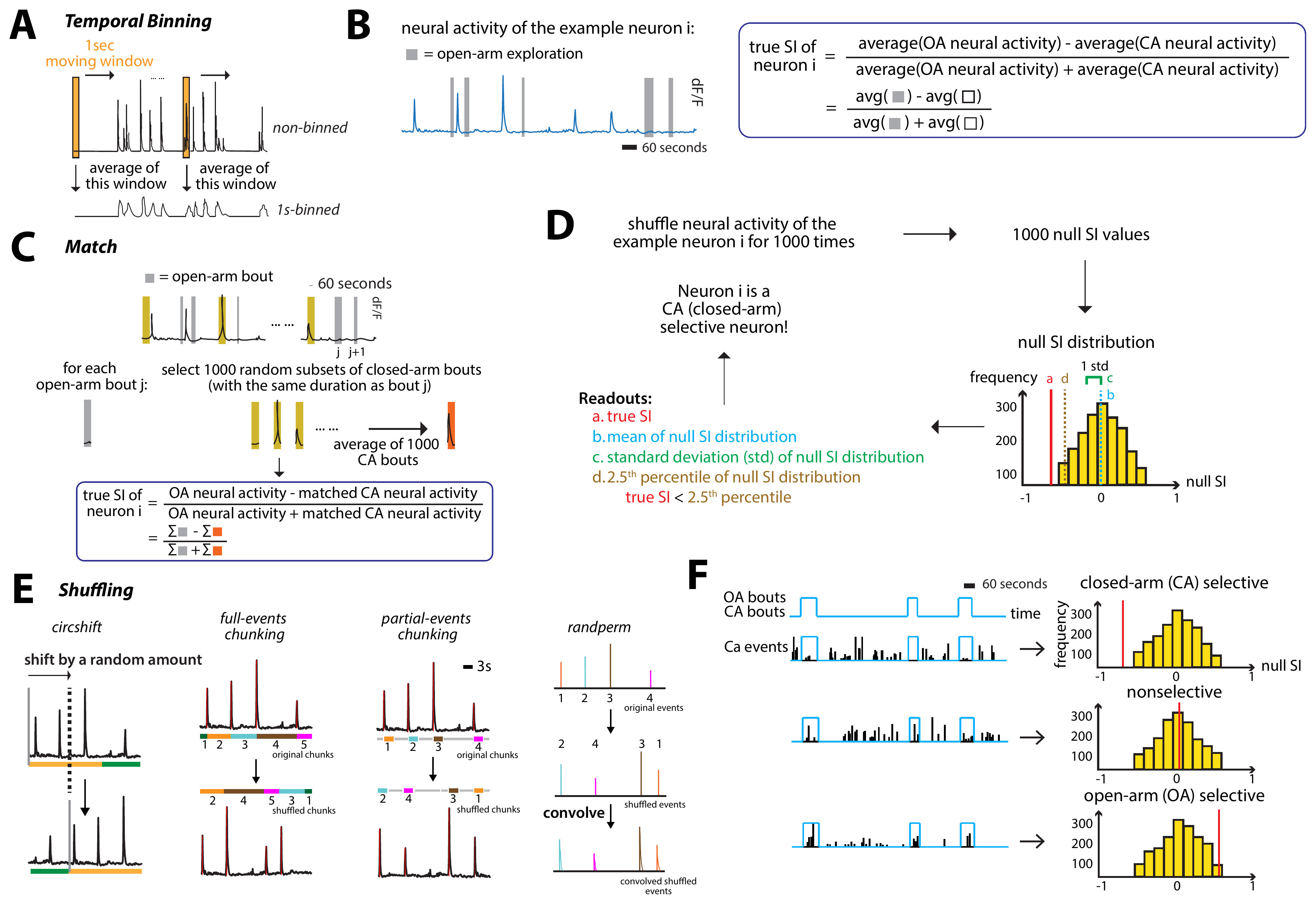
Figure 3. Characterizing the selectivity of individual neurons using a selectivity index. (A) Non-binned calcium transients (top) versus 1-s-binned calcium transients (bottom). The 1-s-binned calcium transients were obtained by averaging values in a moving 1-s window. (B) (Left) Calcium transients of an example neuron that fired preferentially in the closed arm. The time spent in open arms is shown by gray bars. (Right) The formula for calculating the true selectivity index (SI) of an individual neuron. (C) Illustration of the number-matched method. The time spent in open arms is shown by gray bars. Yellow bars refer to random subsets of closed-arm bouts. (D) Steps for determining the selectivity of an individual neuron. (E) Representations of the procedures of the four shuffling methods. In each schematic, numbered/colored blocks denote segments of the neural time-course and their order after shuffling. Randperm permutes individual time points across the whole session; circshift shifts the entire time-course by a random offset with wraparound, preserving local temporal structure; partial_ecm shuffles the order of fixed-duration chunks beginning at each detected Ca2+ event, together with the remainders of the intervals between them (gray blocks); and full_ecm shuffles the order of the inter-event-interval chunks, each spanning one event to just before the next. (F) (Left) Calcium events from the three example neurons aligned to arm occupancy: closed-arm selective (top row), non-selective (middle), and open-arm selective (bottom). (Right) SI null distribution for each of these neurons obtained by computing SI values from shuffled data. Red line: true SI value of the neuron. Adapted from Huang et al. (2026), eNeuro [21].
E. Label consistency analysis
All steps in this section are implemented in compute_label_consistency.m, called automatically during Stage 3.
1. Compute pairwise label consistency. For each pair of parameter settings (i, j), label consistency is defined as the percentage of neurons assigned the same selectivity label (OA-selective, CA-selective, or non-selective) by both settings. This produces a symmetric 120 × 120 matrix of pairwise label consistency values (in percent) (Figure 4A).
2. Compute 95% bootstrap confidence intervals. For each matrix entry (i, j), neurons are resampled with replacement 1,000 times (cfg.num_shuffle_iterations). For each bootstrap sample, the pairwise label consistency between settings i and j is recomputed. The 95% CI is derived from the resulting bootstrap distribution of label consistencies.
3. Threshold the consistency matrix to classify effect sizes. Each matrix entry is classified based on the lower bound of its 95% bootstrap CI compared to thresholds set in config.m (cfg.consistency_high_threshold = 90, cfg.consistency_low_threshold = 80) (Figure 4B):
• Small effect (red shading): lower bound of 95% CI ≥ 90% (consistency significantly greater than 90%).
• Medium effect (orange shading): lower bound of 95% CI ≥ 80% but < 90%.
• Large effect (yellow shading): lower bound of 95% CI < 80% (consistency not significantly greater than 80%).
4. Assess the mechanism of label inconsistency. For each pair of parameter settings with medium or large effects (non-red entries in the thresholded matrix):
• True SI congruence: Robust linear regression (MATLAB's robustfit) is used to fit a line to the scatter of true SI values from the two settings. The slope is assessed for significant deviation from 1 using a 99% bootstrap CI (1,000 iterations). A slope significantly different from 1 indicates that the two settings produce systematically different SI values (Figure 4C). The 99% CI is used (instead of 95%) as a conservative heuristic correction for multiple comparisons.
• Null STD congruence: The same robust regression procedure is applied to the standard deviation of the null SI distributions from the two settings. A slope significantly different from 1 indicates systematically different null distributions.
• Classification: Inconsistent pairs are classified as (Figure 4D): (a) differences attributable to both true SI and null STD (pink), (b) true SI only (green), or (c) null STD only (purple). These are visualized as three additional 120 × 120 heatmaps by result_interpretation.m.
5. Outputs. compute_label_consistency.m saves label_table.mat (a [120 × N_total] matrix of neuron labels per setting) and consistency_table.mat (a struct containing pct_consistency, ci_lower, and thresholded matrices) to results/analysis/.
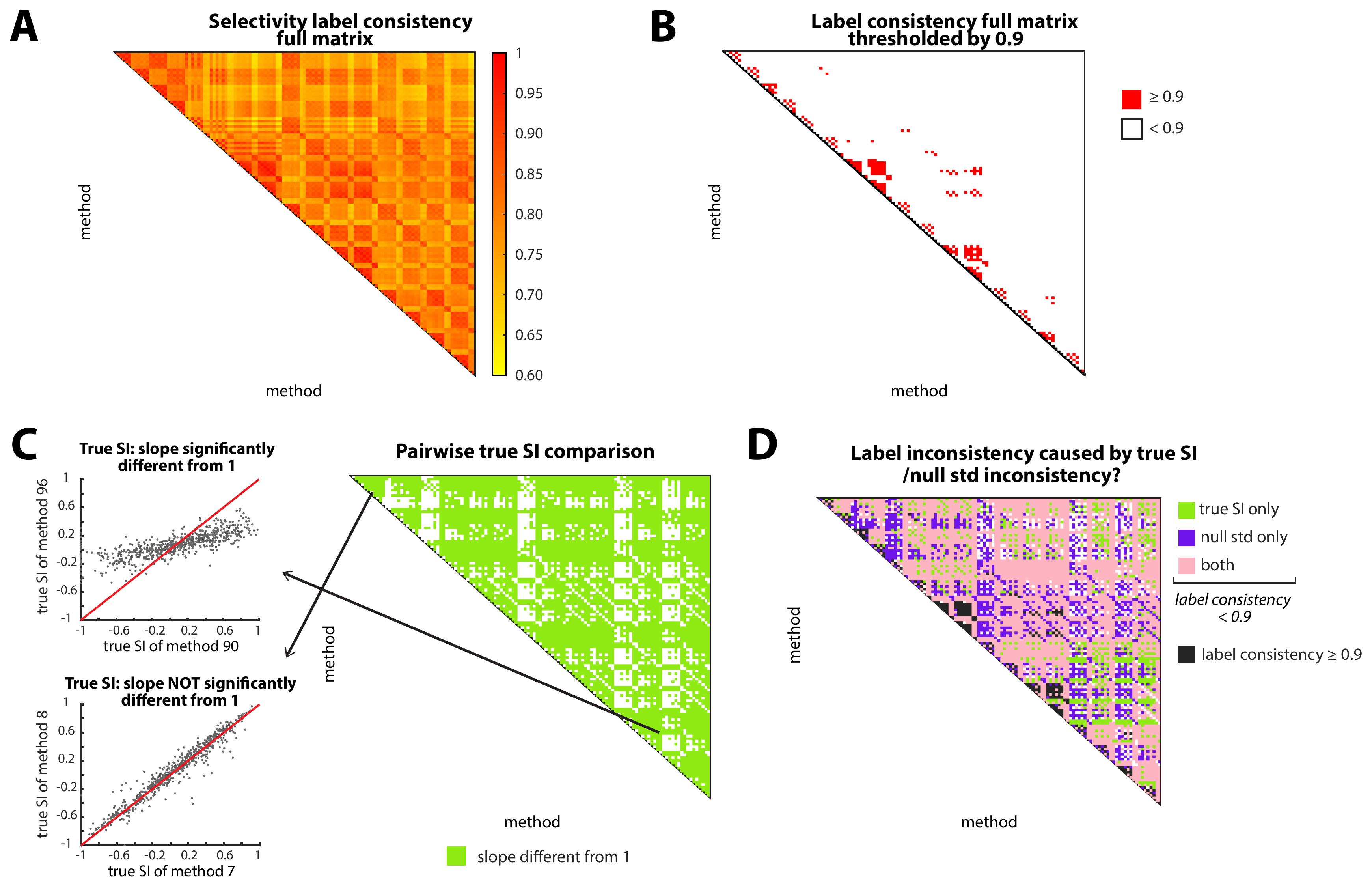
Figure 4. Effects of parameters on label consistency, and mechanisms of inconsistency. (A) Pairwise label consistency matrix. A 120 × 120 matrix visualizing the effect of parameter settings on neuron selectivity labels (OA-selective, CA-selective, or non-selective). Label consistency: % of neurons assigned the same label by two parameter combinations. Bootstrap confidence intervals (CIs) are not shown here, but are incorporated in panel B. Settings are ordered along both axes as they were enumerated in the original study [21], in which the shuffling method varies most slowly and the temporal binning width most quickly (shuffling method, then OA/CA data matching, then behavioral data type, then neural data type, then binning width). The matrix therefore has a nested block structure: the outermost blocks are the four shuffling methods, in the order randperm (the first 24 rows and columns; 24 rather than 32, because the eight ca_traces × randperm combinations are excluded), partial_ecm, full_ecm, and circshift (32 each); and within each such block, matched settings precede non-matched settings, body-centroid precedes head-centroid behavioral data, the four neural data types follow in the order ca_events, ca_convolved_2s, ca_convolved_4s, ca_traces, and native binning precedes 1 s binning (see Table 2). (B) Thresholded label consistency matrix (from A). Red shading indicates a small effect (consistency values significantly greater than 0.9); significance was computed using bootstrap confidence intervals (CIs) for each matrix entry. (C) Congruence matrix of computed SI between all pairs of parameter settings (120 × 120; Right). Each entry represents whether the line fit to the scatterplot of SI values from that pair deviates significantly from 1 (bootstrap approach). Left: Two example best-fit lines, representing low (top) and high (bottom) true SI congruence. (D) Matrix showing congruence of computed SI and null STD. Black indicates parameter pairs with label consistency significantly greater than 0.9. For the rest, green indicates low congruence of computed SI values, purple indicates low congruence of null STD values, and pink indicates low congruence for both metrics. Adapted from Huang et al. (2026), eNeuro [21].
F. Template neuron identification and accuracy/robustness analysis
Steps in this section are implemented in identify_template_neurons.m and compute_accuracy_robustness.m, called automatically during Stage 4.
F1. Template neuron identification
1. Identify template neuron candidates. Template neurons serve as ground-truth references for accuracy evaluation. They are identified from the pooled neuron dataset using raw Ca2+ events under native binning. For each available behavioral data type (head, body), the normalized firing-rate difference is computed from the same amplitude-weighted activity measure used in step D3:
norm_diff = (avg_OA - avg_CA)/(avg_OA + avg_CA)A neuron qualifies as a template candidate only if it crosses the threshold under all behavioral types available in the data (thresholds set in config.m):
• OA-selective template: norm_diff > cfg.template_oa_threshold (default: 0.85) for all behavioral types.
• CA-selective template: norm_diff < cfg.template_ca_threshold (default: -0.85) for all behavioral types.
• Non-selective template: |norm_diff| ≤ cfg.template_nonsel_threshold (default: 0.05) for all behavioral types.
2. Review template candidates interactively. identify_template_neurons.m launches an interactive figure for each session, showing one subplot per candidate neuron (Figure 5A). Each subplot displays the Ca2+ events raster with OA frames (red) and CA frames (blue) concatenated, along with the behavioral zone shading and the computed norm_diff values. Checkboxes allow the user to toggle neurons for exclusion. Click Confirm to accept the displayed selection for each session. The confirmation mode is set by cfg.template_review: “interactive” (the default) opens these figures; “replay” re-applies a selection previously saved to results/analysis/template_selection.mat; and “auto” accepts every threshold-based candidate without prompting. Because interactive review makes a run dependent on operator decisions, curate the template set once with “interactive” and then use “replay” to reproduce that run exactly.
Note: Template neurons are identified once from the full pooled dataset, prior to bootstrap and cross-validation procedures. The thresholds in config.m are heuristic and can be adjusted if no template neurons are identified (see Troubleshooting). In the original study, 33 template neurons were identified from 692 neurons (7 OA-selective, 13 CA-selective, 13 non-selective). Visual verification of the selected neurons is strongly recommended.
F2. Accuracy computation
3. Compute accuracy for each parameter setting. Accuracy is defined as the percentage of template neurons that are assigned their correct selectivity label by a given parameter setting:
• An OA-selective template neuron is correctly labeled if the setting assigns it label +1.
• A CA-selective template neuron is correctly labeled if the setting assigns it label -1.
• A non-selective template neuron is correctly labeled if the setting assigns it label 0.
Accuracy ranges from 0% to 100%. It assesses whether a setting yields correct labels on neurons whose ground-truth label is known, independently of how consistent the setting is across the parameter space.
F3. Robustness computation
4. Compute combined robustness for each parameter setting. Combined robustness is computed hierarchically using the pairwise label consistency values from section E (Figure 5B):
• Per-level average robustness: For each level of each parameter dimension (e.g., ca_events within the neural data type dimension), the average robustness of that level is the mean pairwise label consistency (%) across all pairs of parameter settings that share that level. This captures how consistently a given parameter level is associated with a specific label assignment under perturbations to the other parameters.
• Combined robustness of a setting: The combined robustness is the mean of the five per-level average robustness values (one per parameter dimension). Settings whose constituent levels each have high average robustness receive a high combined robustness score.
F4. Optimal setting identification
5. Identify optimal parameter settings. identify_optimal_settings.m constructs a 2D scatterplot of accuracy (x-axis) versus combined robustness (y-axis) for all 120 settings (Figure 5C). A setting is designated optimal if it simultaneously meets both criteria:
• Accuracy == 100%.
• Combined robustness ≥ the percentile of all robustness scores specified by cfg.robustness_percentile_threshold (default: 80th percentile).
Note: If no setting meets both criteria, identify_optimal_settings.m falls back progressively: first to all settings with accuracy == 100% regardless of robustness, then to the single best-accuracy, best-robustness setting (accuracy prioritized over robustness), with a warning in each case. The identity of the optimal setting is a finding of the analysis, not a fixed recommendation; it may differ across datasets.
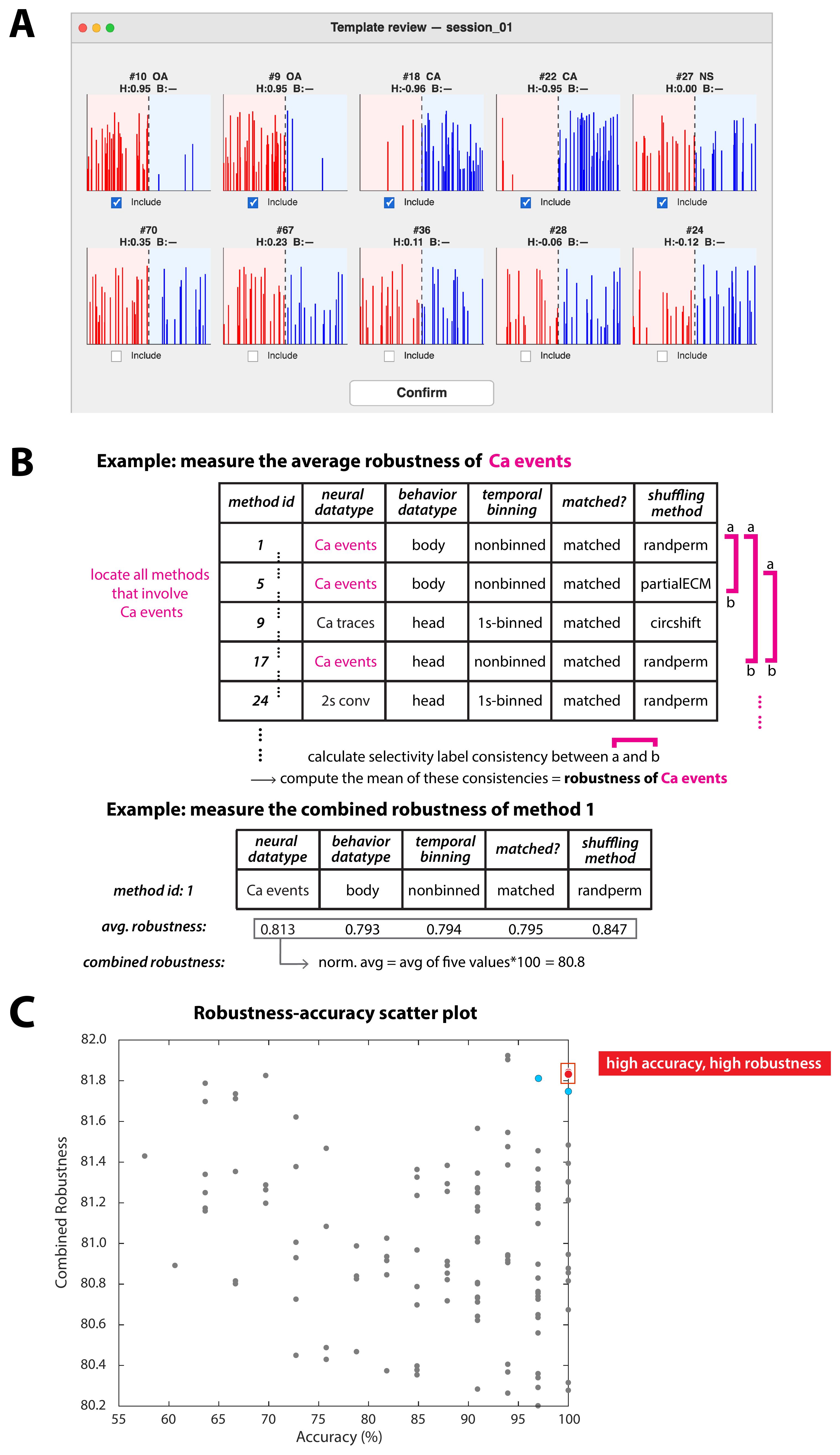
Figure 5. Accuracy and robustness analysis of parameter settings. (A) Screenshot of the interactive graphical user interface (GUI) used to manually identify the template neurons—neurons with activity patterns sufficiently distinctive to infer their selectivity label by visual inspection. The GUI displays concatenated Ca2+ events (red = OA occupancy periods; blue = CA occupancy periods) for individual neurons alongside the candidate template type each one qualified as, and its computed normalized firing-rate differences (H = head-centroid-based, B = body-centroid-based; shown as a dash if the corresponding behavioral data are unavailable). Top: Template neuron candidates, each labeled with the type it qualified as (OA, CA, or NS) and retained on visual inspection, so its Include box remains checked. Bottom: Neurons that did not qualify, whose normalized firing-rate differences fall between the selective and non-selective thresholds (step F1), so that no candidate type is shown, and the Include box is cleared. In normal operation, the GUI presents candidates only; the thresholds were relaxed for this illustration so that non-qualifying neurons appear alongside them for comparison. (B) Robustness calculation. Top: Procedure for calculating the average robustness of a specific parameter value, using calcium events as an example. Consistency values from Figure 4A were used. Bottom: Calculation of combined robustness across all five parameter values. (C) Scatter plot of combined robustness versus accuracy. Red dots: Two (nearly overlapping) optimal parameter settings with the highest values of both accuracy and combined robustness. Blue dots: The next best settings behind the two optimal ones. Adapted from Huang et al. (2026), eNeuro [21].
G. Validation of optimal parameter settings
All steps in this section are implemented in run_bootstrap_validation.m and run_crossvalidation.m, called automatically during Stages 5 and 6.
G1. Bootstrap resampling validation
1. Generate bootstrap samples. Generate cfg.num_bootstrap_iterations (default: 500) bootstrap samples of the full neuron dataset, each drawn with replacement and matched in size (N_total neurons) to the original dataset. The proportions of template neurons of each type (OA-selective, CA-selective, non-selective) and non-template neurons in each sample are matched to the original dataset (Figure 6A, left).
2. Evaluate settings on each bootstrap sample. For each bootstrap iteration: (a) compute accuracy and combined robustness for each of the 120 parameter settings using the bootstrap sample; (b) identify the optimal setting(s) using the same criteria as in section F (Figure 6A, right).
3. Summarize bootstrap results. Across all 500 iterations, tally the number of times each parameter setting is identified as first-optimal and second-optimal. A setting is considered robustly optimal if it appears as first- or second-optimal in a large fraction of iterations (Figure 6B). Results are saved to results/analysis/bootstrap_results.mat.
G2. Hold-out cross-validation
4. Generate training-testing splits. Generate cfg.num_cv_iterations (default: 200) random training-testing splits of the full neuron dataset. In each split, cfg.cv_train_fraction (default: 0.6, i.e., 60%) of neurons are assigned to the training set and the remaining 40% to the testing set. The split is stratified: OA-selective, CA-selective, and non-selective template neurons, and non-template neurons, are each divided in the same proportion, so that every class is represented in both sets (Figure 6C). A class with only one template neuron cannot be split; that neuron is assigned to both the training and the testing set.
Note: The 60/40 ratio is set by the size of the smallest template class rather than by the size of the dataset as a whole. Accuracy can only be evaluated on a set that contains at least one template neuron of each type, so the split must leave the rarest template class populated on both sides. In the original study, the rarest class comprised 7 OA-selective neurons among 33 template neurons, and the 60/40 split yielded training subsets of 20 template neurons (4 OA-selective, 8 CA-selective, 8 non-selective) and testing subsets of 13 template neurons (3 OA-selective, 5 CA-selective, 5 non-selective) [21]—enough for both sets to be scored, while keeping the training set large enough to rank all 120 settings stably. If the user's dataset yields fewer template neurons of any one type, they should raise cfg.cv_train_fraction (e.g., to 0.7 or 0.8) so that the training set retains at least two templates of each type, and expect the testing-set rankings to be correspondingly noisier. If the rarest class contains only one or two template neurons, hold-out cross-validation is not informative, and the bootstrap resampling validation described above should be relied on instead.
5. Evaluate settings on training and testing sets. For each iteration: (a) compute accuracy and robustness for all 120 settings using the training set; identify the optimal setting(s). (b) Compute accuracy and robustness for all 120 settings using the testing set; identify the optimal setting(s).
6. Assess generalizability. (a) Tally the number of times each setting is identified as first- or second-optimal in both the training and testing sets. (b) For each iteration, compute the Spearman rank correlation (ρ) between the full ranking of all 120 settings derived from the training set and the ranking derived from the testing set. The distribution of ρ across 200 iterations is summarized (Figure 6D); the median ρ is used as the primary measure of overall generalizability of parameter setting rankings to held-out data.
Critical: A median ρ ≥ 0.7 is taken as evidence of good generalizability. Results are saved to results/analysis/cv_results.mat. If the median ρ falls below 0.7, the user should not treat the identity of the single top-ranked setting as established. Instead, (i) the user should check whether the shortfall is driven by too few template neurons, by inspecting the size of the rarest template class in template_info.mat: if it contains only one or two neurons, the dataset is too small for this validation, and the criterion is uninformative rather than failed; (ii) if template numbers are adequate, the user should treat the settings that appear as first- or second-optimal across the majority of iterations as jointly acceptable rather than selecting one, as described in Troubleshooting Problem 4; and (iii) report the median ρ alongside any conclusion about the optimal setting, so that readers can judge how strongly the ranking is determined by the data.
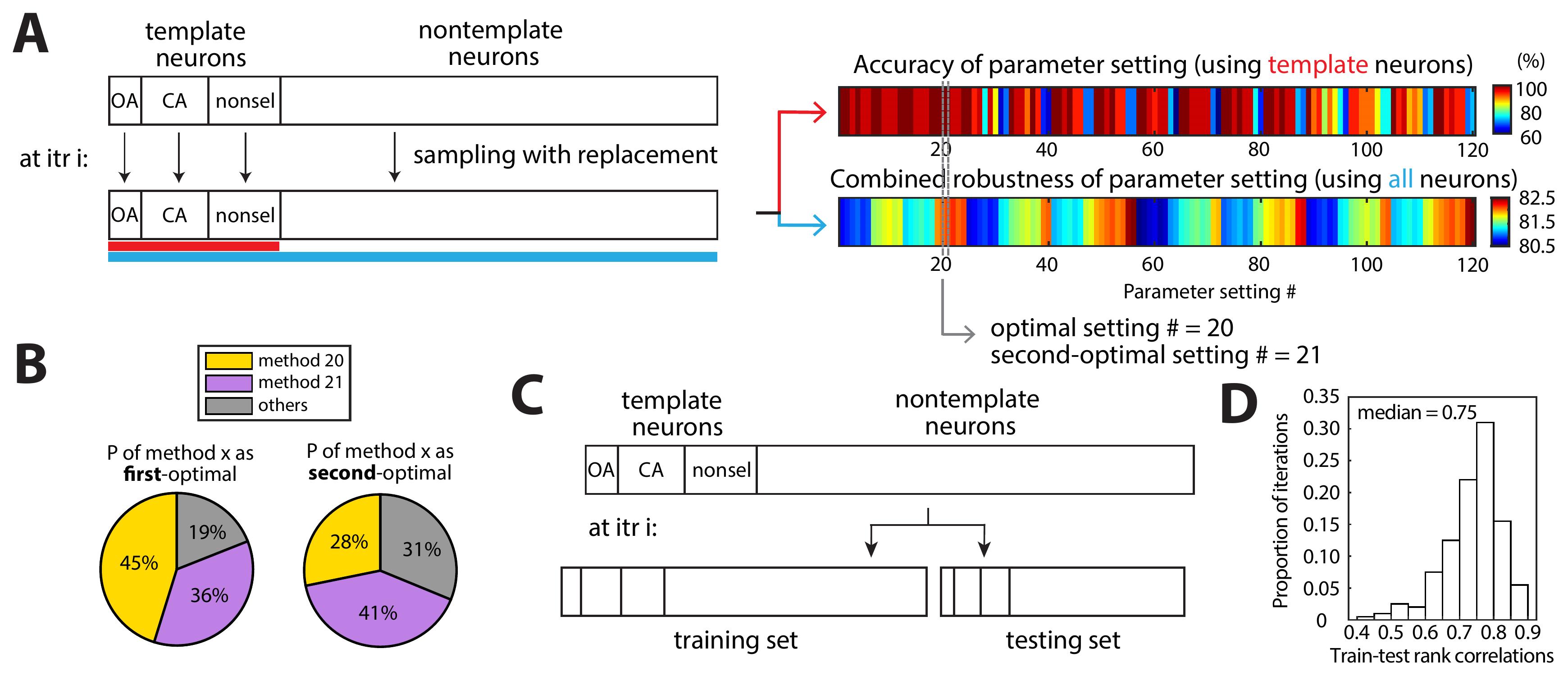
Figure 6. Validation of the identified optimal parameter settings. (A, B) Bootstrap validation. (A) Schematic illustration of the bootstrapping validation procedure, showing a single iteration as an example. (B) Bootstrap results for the first-optimal and second-optimal setting identity (pie chart summarizing proportions). (C, D) Hold-out cross-validation. (C) Schematic of one hold-out cross-validation iteration. Neurons are randomly split into a training set (default: 60%) and a testing set (default: 40%), preserving class proportions. Accuracy and robustness are computed independently on training and testing sets; “goodness” of settings is ranked in each. (D) Distribution of Spearman rank correlations between training and testing datasets of the ranking of all the parameter settings across cross-validation iterations. Adapted from Huang et al. (2026), eNeuro [21].
H. (Optional) GLM-based generality analysis
This optional section tests whether the optimal parameter setting(s) identified via the SI framework generalize to a regression-based approach [28]. All steps are implemented in run_GLM_analysis.m, called automatically during Stage 7 if cfg.run_glm_analysis = true in config.m. To skip, set cfg.run_glm_analysis = false.
1. Fit GLM models. For each neuron, its instantaneous neural activity (Yt) at each time point is modeled as a function of a binary behavioral regressor (Xt = 1 if OA, Xt = 0 if CA) (Figure 7A). Two GLM distributions are evaluated [29] (set in cfg.glm_distributions):
• Linear model (“normal”): Yt = β0 + β1 · Xt + εt, where εt ~ N(0, σ2).
• Poisson GLM (“Poisson”): Yt ~ Poisson(λt), where log(λt) = β0 + β1 · Xt.
2. Assess statistical significance via a permutation test. For each neuron, the neural activity time-course (Yt) is shuffled cfg.num_glm_permutations times (default: 100) using the same shuffling method as the parameter setting under test (step D4), while the behavioral regressor (Xt) is left unshuffled; the GLM is refit for each shuffled dataset. Empirical p-values are computed as the proportion of shuffled |β1| values that exceed the observed |β1|. A neuron is classified as OA-selective (positive significant β1), CA-selective (negative significant β1), or non-selective (non-significant β1) at p = 0.05.
Note: The default of 100 GLM permutations is lower than the 1,000 shuffle iterations used for the SI null distribution (step D4) for two reasons. First, the two serve different roles: the SI null distribution is the basis of the protocol's primary inference and is computed for all 120 parameter settings, whereas the GLM module is an optional generality check applied only to the small number of settings already identified as optimal. Second, the cost per iteration is far higher, because each GLM permutation requires refitting a generalized linear model for every neuron rather than recomputing a scalar average, so the permutation count trades directly against runtime. 100 permutations bound the resolution of the empirical p-value at 0.01, which is adequate for the two-tailed p = 0.05 test used here, but coarse. Users can increase cfg.num_glm_permutations to 1,000 or more if they intend to apply a correction for multiple comparisons across neurons, if they require p-value resolution finer than 0.01, or if their dataset contains few neurons, where the label of each individual neuron carries proportionally more weight in the SI-GLM consistency percentage. Because that consistency metric is a percentage of neurons, a coarse permutation null affects it only through neurons whose p-values lie near the threshold; inspecting how many neurons fall close to p = 0.05 is a quick check of whether the permutation count is limiting.
3. Apply the GLM using the optimal parameter settings. The GLM is run using the data format specified by each of the optimal SI-based parameter settings. Each optimal setting is combined with both link functions, yielding up to 2 × |optimal settings| GLM configurations.
4. Quantify SI-GLM label consistency. For each GLM configuration, label consistency is computed as the percentage of neurons assigned the same selectivity label (OA-selective, CA-selective, non-selective) by both the SI approach and the GLM approach (Figure 7B). A consistency >90% is taken as evidence that the optimal SI-based parameter setting produces reliably generalizable selectivity characterizations. Results are saved to results/analysis/glm_results.mat.
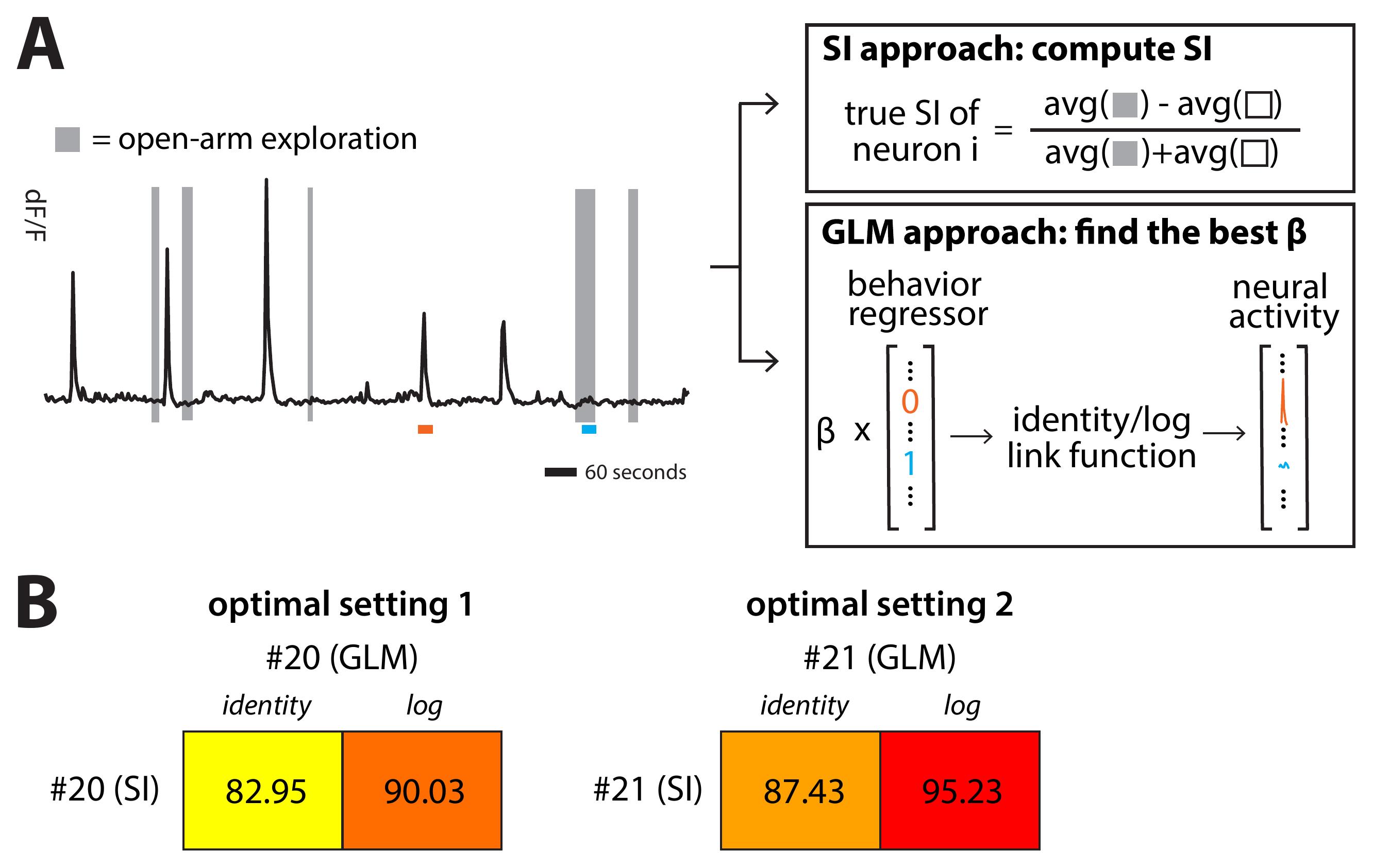
Figure 7. Generality of the optimal parameter settings across selectivity inference procedures. (A) (Left) Calcium transients of an example neuron. The time spent in open arms is shown by gray bars. (Right) Schematic comparison of the SI approach, which uses average activity, and the GLM approach, which models instantaneous activity. Values of the calcium trace and behavioral regressor at two example time points (marked in orange and blue) illustrate the differences in input to each method. (B) Selectivity label consistency, defined as the percentage of neurons assigned the same selectivity label under both the SI and GLM approaches, for the two optimal parameter settings identified via the SI approach. The two settings are additionally coupled with either an identity or a log link function when using the GLM approach. Adapted from Huang et al. (2026), eNeuro [21].
I. Result visualization and interpretation
All result figures are generated automatically by result_interpretation.m, called as Stage 8 of the pipeline. Figures are saved to cfg.figures_folder (default: results/figures/). Set cfg.figures_folder = '' to suppress saving figures to disk.
1. Consistency heatmaps (section E outputs). result_interpretation.m generates: (a) the full pairwise label consistency heatmap (Figure 4A); (b) the thresholded consistency matrix with color-coded effect sizes (Figure 4B); (c) submatrix analyses for each parameter; (d) the true SI congruence matrix (Figure 4C); (e) the null STD congruence matrix; (f) the combined congruence matrix (filtered by consistency threshold) (Figure 4D).
2. Accuracy and robustness outputs (section F outputs). result_interpretation.m generates the accuracy heatmap/histogram, robustness heatmap/histogram, and the key accuracy versus combined robustness scatterplot (Figure 5C).
3. Validation outputs (section G outputs). Bootstrap first/second-optimal pie charts (Figure 6B) and histograms, cross-validation pie charts, and the rank correlation distribution (Figure 6D) are generated.
4. GLM output (section H, optional). If the GLM module was run, a heatmap of SI-GLM label consistency across link function × optimal setting combinations (Figure 7B) is generated.
Result interpretation
Label consistency matrix (section E): A matrix in which most entries fall below 90% consistency indicates that parameter choices have a pervasive and substantial impact on inferred selectivity labels. This is the expected outcome and motivates the accuracy and robustness analysis. If the matrix is dominated by high-consistency entries (>90%), the dataset may be large enough or neurons sufficiently strongly selective that the analysis is robust to parameter choices. In either case, proceed with the accuracy and robustness analysis to identify the best-performing settings.
Accuracy and robustness scatterplot (section F): Settings in the upper-right quadrant (high accuracy, high robustness) represent the optimal choices. If no settings achieve 100% accuracy, lower the accuracy threshold incrementally and identify settings that give the best accuracy (and the best robustness when the same accuracy is achieved). Conversely, if many settings achieve 100% accuracy, the robustness threshold becomes the primary discriminator.
Bootstrap and cross-validation results (section G): The optimal setting(s) should appear as first- or second-optimal in the majority of bootstrap iterations for the optimality conclusion to be considered robust. The median Spearman rank correlation across cross-validation iterations (target: ≥0.7) provides evidence that the ordering of settings is generalizable to held-out data.
GLM generality (section H, optional): A setting that achieves high label consistency between the SI and GLM approaches (>90%) can be considered broadly optimal across both analytical approaches. A setting with high SI-based accuracy and robustness but poor GLM consistency may be well-suited only to average-response-rate-based analyses and should be interpreted with caution.
Validation of protocol
This protocol has been used and validated in the following research article:
• Huang et al. [21]. Reliable inference of the encoding of task states by individual neurons using calcium imaging. eNeuro (2026), 13(1). https://doi.org/10.1523/ENEURO.0378-25.2025
General notes and troubleshooting
General notes
1. This protocol assumes that calcium imaging data have been preprocessed using IDPS or equivalent software (e.g., CaImAn or Suite2p) [23–24], yielding per-neuron fluorescence traces and discrete calcium event time-courses, and that behavioral tracking has been performed using EthoVision (Noldus Inc., v11.5) or equivalent software (e.g., DeepLabCut) [25], yielding per-frame binary behavioral labels. All procedural steps from section A onward describe computational analyses performed in MATLAB (R2021b or later).
2. The complete MATLAB codebase (Code S1) is available at Zenodo. Individual module scripts correspond directly to the stages of this procedure. The master script run_full_pipeline.m calls all modules in sequence via run_pipeline_stages.m. Users may also run modules independently.
3. All steps assume data from one or more behavioral sessions, all listed in config.m. Neurons are pooled across sessions for all downstream analyses (consistency, accuracy, robustness, bootstrap, cross-validation).
4. The term "parameter setting" refers to a unique combination of levels across the five key analysis parameters. There are 120 valid parameter settings in total (see section C).
5. Applicability to other datasets: Although developed and validated using GCaMP6f imaging of CaMKII+ excitatory neurons in the mPFC of freely behaving mice, the pipeline is applicable to any calcium imaging dataset involving a two-state behavioral task. For other calcium indicators (e.g., jGCaMP7f, jGCaMP8), different cell types, or different brain areas, the identity of the optimal parameter setting may differ from that found in the original study. The pipeline is likewise agnostic to the biophysical origin of its input: it requires only (i) a per-frame activity time-course for each region of interest and (ii) for the event-based data types and the two events-chunking shuffling methods, a matching time-course of discrete detected events. Any optical sensor whose output can be reduced to these two forms, including neurotransmitter or neuromodulator sensors and genetically encoded voltage indicators, can in principle be analyzed, and the central purpose of the framework—quantifying how much the inferred labels depend on analysis choices—applies with equal force to such data. Two caveats govern the choice of parameters in that case. First, kinetics: the convolution kernel widths and the event-chunk durations are tied to the decay kinetics of GCaMP6f and would need to be shortened substantially for genetically encoded voltage indicators, whose signals are orders of magnitude faster and typically require much higher sampling rates than the 20 Hz used here. Second, interpretation: neurotransmitter and neuromodulator sensors (e.g., dLight or the GRAB family) report release in the neighborhood of the imaged structure rather than the spiking of the imaged cell, so a "selective" label should be read as selectivity of the measured signal rather than of a neuron's output. Subject to these caveats, we would expect the accuracy and robustness framework to transfer, but we have not tested it on data from these sensors.
6. Minimum dataset size: The accuracy metric requires at least one confirmed template neuron of each selectivity type (OA-selective, CA-selective, non-selective). Datasets with fewer than approximately 500 neurons may yield too few template neurons for reliable accuracy estimation. In such cases, the robustness metric alone may be used as the primary criterion for setting selection, or the template neuron thresholds in config.m may be relaxed.
7. Demo run for new users: New users are encouraged to first run demo_run.m, which generates a small synthetic dataset, writes it to demo_output/data/ as CSV files in exactly the format the pipeline expects for real data, and then executes every pipeline stage on it with reduced iteration counts so that the run completes quickly. The archived code deposit includes a reference copy of both these synthetic input files and the complete set of expected outputs, in demo_output_gold/ (Data S1), which the demo never writes to: the per-setting SI files, the label and consistency tables, template neuron information, the accuracy and robustness tables, bootstrap and cross-validation results, GLM results, the enumerated parameter settings table, and all result figures. Before running the pipeline on real data, the user is advised to compare their own CSV files against those in demo_output_gold/data/ to confirm formatting; after running the demonstration, the user should compare their own output in demo_output/results/ against demo_output_gold/results/ to confirm that all modules are functioning correctly. The deposit includes a script, verify_reproducibility.m, that performs this second comparison automatically—every input CSV byte for byte and every saved variable—and reports any mismatch. The synthetic dataset comprises two sessions of 75 neurons each recorded for 10 min, one at 20 Hz and one at 10 Hz, so that the handling of variable frame rates (step A1) is exercised as well. The demonstration sets cfg.template_review = 'auto', so Stage 4 accepts all threshold-based template candidates without prompting (step F2), and the whole run completes unattended.
8. Applicability of protocol to inferences about encoding of task states by neural populations: The framework extends naturally to assessing robustness of parameter combinations for inferences about population-level neural encoding as well. The extension described in this note is presented as a conceptual roadmap: unlike sections A–H, it is not implemented in the accompanying code release, and users wishing to apply it will need to supply their own classifier and null-distribution code following the logic below. The pipeline described thus far rests on a single abstraction: derive a scalar metric from comparison of each neuron's activity across two states, test it against a null distribution, and assign a task-state label to that neuron. The population-level analog replaces neuron-by-neuron selectivity labels with time bin-by-time bin occupancy labels, but otherwise follows the same logic. Specifically, the population-level analog derives a scalar metric at each time bin from the instantaneous activity vector of the simultaneously recorded neural population, tests this scalar against a null distribution, and assigns a predicted task-state label to that time bin. To this end, we first train a classifier to discriminate OA occupancy from CA occupancy (for this protocol's dataset) using the multidimensional population activity vector r(t) and the animal's position at each time bin as inputs, then project the population activity vector at each time bin onto the classification axis. We refer to this projection as the population selectivity index, pop_SI: pop_SI(t) is the scalar projection of r(t) onto the classifier weight vector w (Figure 8A) and is the population-level analog of the single-neuron SI. This scalar metric is strongly positive for OA-encoding time bins, strongly negative for CA-encoding time bins, and near zero for non-encoding time bins. Correspondingly, a null pop_SI value is the projection obtained at the same time bin after the OA and CA labels have been randomly reassigned and the classifier retrained on the relabeled data; repeating this shuffle yields a null distribution of pop_SI values for each time bin (Figure 8B), exactly as shuffled single-neuron data yield a null SI distribution in section D. Label assignment follows the same null-distribution logic as before: the population activity at any time bin would be labeled OA-encoding if its pop_SI exceeds the 97.5th percentile of its null distribution, CA-encoding if it falls below the 2.5th percentile, and non-encoding otherwise (Figure 8C). All subsequent pipeline stages apply similarly as before: the four shuffling methods in section D are applied to the population activity matrix (rows = neurons, columns = time bins) by randomly shuffling the time points (columns) of the matrix and reprojecting the shuffled population vector at each time bin onto wnull trained on the shuffled data. Following this, the five parameter dimensions in section C yield the same 120 valid settings. For each setting, the accuracy (section F) is the percentage of time bins correctly labeled by this parameter setting—a time bin is correctly labeled if its assigned pop_SI label matches the animal's known behavioral state at that time (in other words, "ground truth"). Similarly, the pairwise consistency computation between settings (section E) follows the same logic as before (computed as the percentage of time bins assigned the same labels by both settings). As a result, the robustness of each setting (section F) is computed identically as before, as the mean pairwise consistency across settings.
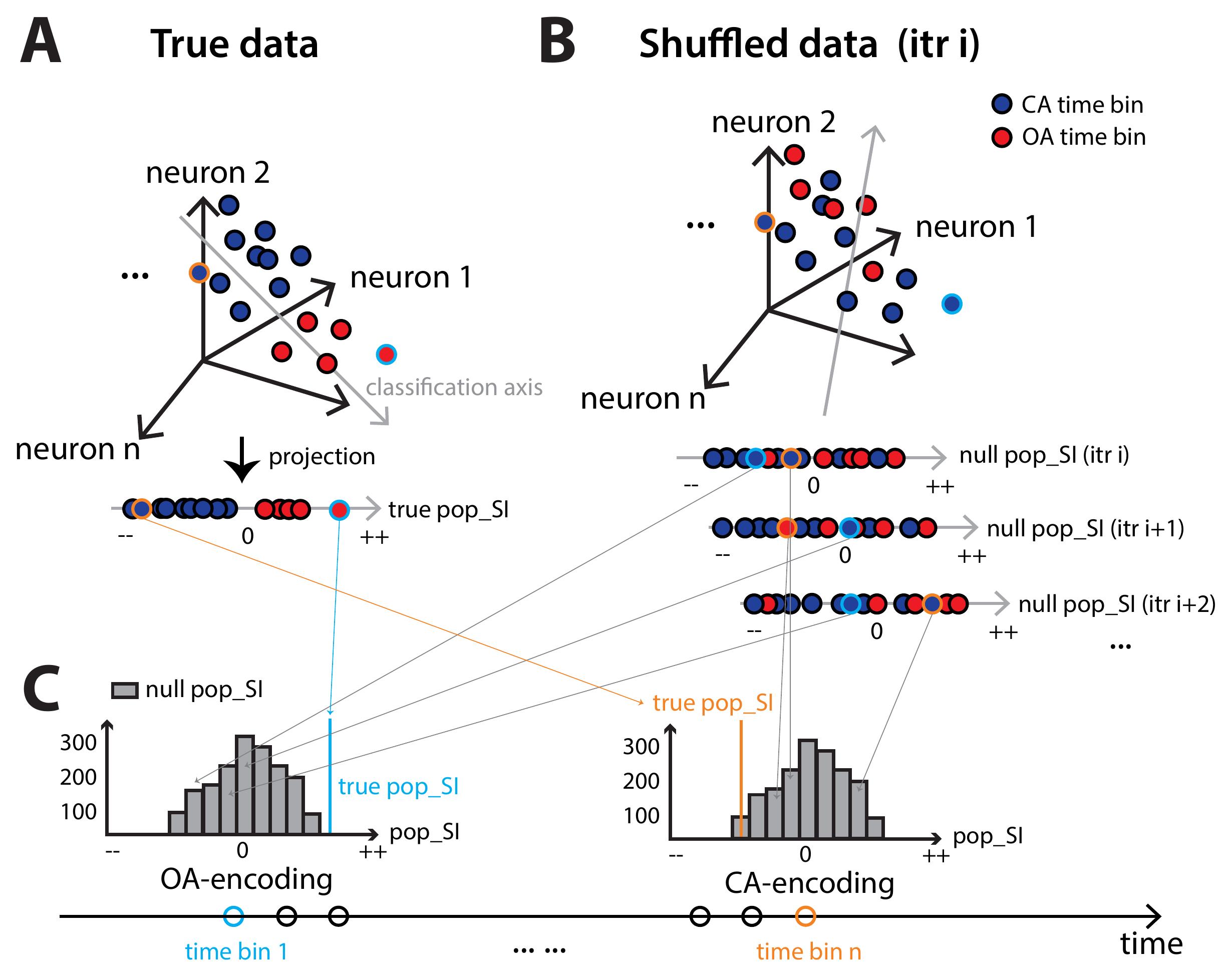
Figure 8. Extension of the pipeline to population-level analysis. (A) (Top) Population activity vectors measured at different time bins are represented as dots in an N-dimensional neural state space; each dot = population activity at one time bin. A linear decoder trained on the true data identifies the classification axis separating population activity vectors during open-arm (OA; red) versus closed-arm (CA; blue) occupancy. (Bottom) Following this, the population activity vector at each time bin is projected onto this classification axis to yield its "true" pop_SI value. Two example time bins are highlighted as orange-outlined and cyan-outlined dots. (B) (Top) Shuffling for the null hypothesis. For each shuffle iteration, OA and CA occupancy designations are assigned randomly to the measured population activity vectors (i.e., blue and red colors are randomly assigned to the dots). A decoder is then retrained on these relabeled “shuffled” data to produce a new classification axis. (Bottom) Following this, the relabeled population activity vectors are projected onto this new classification axis, yielding one "null" pop_SI value corresponding to the relabeled activity vector at each time bin (first row). Repeating the shuffling produces multiple such "null" pop_SI values corresponding to each time bin (bottom two rows). (C) The null pop_SI values (gray bars) corresponding to each time bin form a null distribution against which the true pop_SI (vertical colored line) is compared. A true pop_SI in the positive tail (left, cyan) indicates reliable OA-encoding by the population activity vector at that time bin; in the negative tail (right, orange), CA-encoding. This procedure is applied to each time bin along the session (bottom timeline).
9. Hardware requirements: The pipeline is CPU-bound and requires no GPU. Memory is the principal constraint, because load_data.m holds the four derived neural data representations for every session in memory simultaneously and writes them to results/analysis/session_data_all.mat; for the two-session, 150-neuron demonstration dataset, this file is approximately 24 MB, and its size scales roughly with the product of the number of neurons, the session duration, and the frame rate. The bundled demonstration (demo_run.m; 2 sessions, 150 neurons, 10 min each, 10 parameter settings and reduced iteration counts) completed in approximately 6 min, excluding MATLAB start-up, on an Apple M3 laptop with 8 CPU cores and 16 GB of RAM running macOS 26 and MATLAB R2025b, with cfg.use_parallel = true and a pool of 8 workers. Of that total, stages 1–6 accounted for approximately 1.5 min, the optional GLM module (section H) for approximately 4 min, and figure generation (section I) for the remainder. A full analysis over all 120 parameter settings with the default iteration counts (1,000 shuffles, 500 bootstrap iterations, 200 cross-validation iterations) is substantially more demanding: runtime scales with the number of settings and the iteration counts, and peak memory with the total number of neurons and frames pooled across sessions. Users with limited memory can reduce peak usage by analyzing fewer sessions at a time or by removing neural data types from cfg.neural_datatypes; users without the Parallel Computing Toolbox should set cfg.use_parallel = false and expect proportionally longer runtimes.
Troubleshooting
Problem 1: No template neurons are identified after running identify_template_neurons.m.
Possible cause: The normalized firing-rate difference does not exceed the 0.85 threshold for any neuron, often due to low overall firing rates, high session-to-session variability, or a dataset in which neurons are weakly selective.
Solution: Reduce the template selection thresholds incrementally in config.m (e.g., cfg.template_oa_threshold to 0.75 or 0.70) and verify that visually identified strongly selective neurons now meet the criterion. Alternatively, manually inspect activity plots of candidate neurons during the interactive review step and include those with unambiguously selective activity patterns.
Problem 2: The label consistency matrix is uniformly high (>90% for nearly all entries).
Possible cause: Neurons in the dataset may have very strong and consistent selectivity that is robust to parameter changes, or the dataset may be large enough that parameter-induced noise is negligible.
Solution: Proceed with accuracy and robustness analysis as usual. If all settings have high accuracy, the choice among them may be less consequential.
Problem 3: Settings that achieve high accuracy may have low combined robustness.
Possible cause: Only a small number of settings can accurately classify the neurons. Many other settings produce inaccurate classifications, and their assignments differ from those of the high-accuracy settings.
Solution: Prioritize accuracy over combined robustness. First, identify the settings with high accuracy. Then, among the settings with equally high accuracy, select the one with the highest combined robustness and treat it as the optimal setting.
Problem 4: The bootstrap or cross-validation procedure does not reproduce the same optimal setting(s) as the full-dataset analysis.
Possible cause: The dataset may be too small to yield stable template neuron sampling across resamples, or the optimal setting may not be substantially better than competing settings.
Solution: Examine the proportion of bootstrap iterations in which the optimal settings are identified as first- or second-optimal. If multiple settings are frequently near-optimal, consider reporting all settings that appear in the top two across >50% of iterations as jointly valid choices.
Problem 5: An error is raised that the Signal Processing Toolbox is not available.
Possible cause: The ca_traces neural data type requires MATLAB's butter() and filtfilt() functions from the Signal Processing Toolbox.
Solution: Install the toolbox. Otherwise, remove 'ca_traces' from cfg.neural_datatypes in config.m to skip this data type. The remaining three neural data types (ca_events, ca_convolved_2s, ca_convolved_4s) do not require the Signal Processing Toolbox. The parameter space will be reduced to 96 valid settings (3 × 2 × 2 × 2 × 4 = 96, with 0 invalid combinations; note randperm is only invalid with ca_traces, so all 3 × 4 shuffling combinations are valid).
Supplementary information
The following supporting information can be downloaded here:
1. Code S1. Complete MATLAB codebase implementing all steps of this protocol.
2. Data S1. Synthetic demonstration dataset and the full set of expected outputs (demo_output_gold/) described in General note 7.
These can also be accessed via https://doi.org/10.5281/zenodo.20046106.
Acknowledgments
This work was supported by start-up funds from Johns Hopkins University (S.P.M. and H.A.). The authors thank members of the Mysore and Adwanikar groups for feedback and discussions.
This protocol is based on methods described and validated in Huang et al. [21].
Author contributions
Conceptualization, S.P.M. and H.A.; Data Collection in the original manuscript, Garima Shah and H.H.; Formal Analysis, H.H.; Software, H.H.; Writing—Original Draft, H.H.; Writing—Review & Editing, all authors; Funding Acquisition, S.P.M. and H.A.; Supervision, S.P.M. and H.A.
Competing interests
The authors declare no conflicts of interest.
References
- Adhikari, A., Topiwala, M. A. and Gordon, J. A. (2011). Single Units in the Medial Prefrontal Cortex with Anxiety-Related Firing Patterns Are Preferentially Influenced by Ventral Hippocampal Activity. Neuron. 71(5): 898–910. https://doi.org/10.1016/j.neuron.2011.07.027
- Jimenez, J. C., Su, K., Goldberg, A. R., Luna, V. M., Biane, J. S., Ordek, G., Zhou, P., Ong, S. K., Wright, M. A., Zweifel, L., et al. (2018). Anxiety Cells in a Hippocampal-Hypothalamic Circuit. Neuron. 97(3): 670–683.e6. https://doi.org/10.1016/j.neuron.2018.01.016
- Gründemann, J., Bitterman, Y., Lu, T., Krabbe, S., Grewe, B. F., Schnitzer, M. J. and Lüthi, A. (2019). Amygdala ensembles encode behavioral states. Science. 364(6437): eaav8736. https://doi.org/10.1126/science.aav8736
- Lee, A. T., Cunniff, M. M., See, J. Z., Wilke, S. A., Luongo, F. J., Ellwood, I. T., Ponnavolu, S. and Sohal, V. S. (2019). VIP Interneurons Contribute to Avoidance Behavior by Regulating Information Flow across Hippocampal-Prefrontal Networks. Neuron. 102(6): 1223–1234.e4. https://doi.org/10.1016/j.neuron.2019.04.001
- Hwang, E. J., Link, T. D., Hu, Y. Y., Lu, S., Wang, E. J., Lilascharoen, V., Aronson, S., O’Neil, K., Lim, B. K., Komiyama, T., et al. (2019). Corticostriatal Flow of Action Selection Bias. Neuron. 104(6): 1126–1140.e6. https://doi.org/10.1016/j.neuron.2019.09.028
- Bellafard, A., Namvar, G., Kao, J. C., Vaziri, A. and Golshani, P. (2024). Volatile working memory representations crystallize with practice. Nature. 629(8014): 1109–1117. https://doi.org/10.1038/s41586-024-07425-w
- Kuan, A. T., Bondanelli, G., Driscoll, L. N., Han, J., Kim, M., Hildebrand, D. G. C., Graham, B. J., Wilson, D. E., Thomas, L. A., Panzeri, S., et al. (2024). Synaptic wiring motifs in posterior parietal cortex support decision-making. Nature. 627(8003): 367–373. https://doi.org/10.1038/s41586-024-07088-7
- Frost, N. A., Haggart, A. and Sohal, V. S. (2021). Dynamic patterns of correlated activity in the prefrontal cortex encode information about social behavior. PLoS Biol. 19(5): e3001235. https://doi.org/10.1371/journal.pbio.3001235
- Fustiñana, M. S., Eichlisberger, T., Bouwmeester, T., Bitterman, Y. and Lüthi, A. (2021). State-dependent encoding of exploratory behaviour in the amygdala. Nature. 592(7853): 267–271. https://doi.org/10.1038/s41586-021-03301-z
- Nair, A., Karigo, T., Yang, B., Ganguli, S., Schnitzer, M. J., Linderman, S. W., Anderson, D. J. and Kennedy, A. (2023). An approximate line attractor in the hypothalamus encodes an aggressive state. Cell. 186(1): 178–193.e15. https://doi.org/10.1016/j.cell.2022.11.027
- Grewe, B. F., Gründemann, J., Kitch, L. J., Lecoq, J. A., Parker, J. G., Marshall, J. D., Larkin, M. C., Jercog, P. E., Grenier, F., Li, J. Z., et al. (2017). Neural ensemble dynamics underlying a long-term associative memory. Nature. 543(7647): 670–675. https://doi.org/10.1038/nature21682
- Chen, T. W., Wardill, T. J., Sun, Y., Pulver, S. R., Renninger, S. L., Baohan, A., Schreiter, E. R., Kerr, R. A., Orger, M. B., Jayaraman, V., et al. (2013). Ultrasensitive fluorescent proteins for imaging neuronal activity. Nature. 499(7458): 295–300. https://doi.org/10.1038/nature12354
- Resendez, S. L., Jennings, J. H., Ung, R. L., Namboodiri, V. M. K., Zhou, Z. C., Otis, J. M., Nomura, H., McHenry, J. A., Kosyk, O., Stuber, G. D., et al. (2016). Visualization of cortical, subcortical and deep brain neural circuit dynamics during naturalistic mammalian behavior with head-mounted microscopes and chronically implanted lenses. Nat Protoc. 11(3): 566–597. https://doi.org/10.1038/nprot.2016.021
- Robbins, M., Christensen, C. N., Kaminski, C. F. and Zlatic, M. (2021). Calcium imaging analysis – how far have we come? F1000Research. 10: 258. https://doi.org/10.12688/f1000research.51755.2
- Wei, Z., Lin, B. J., Chen, T. W., Daie, K., Svoboda, K. and Druckmann, S. (2020). A comparison of neuronal population dynamics measured with calcium imaging and electrophysiology. PLoS Comput Biol. 16(9): e1008198. https://doi.org/10.1371/journal.pcbi.1008198
- Klaus, A., Martins, G. J., Paixao, V. B., Zhou, P., Paninski, L. and Costa, R. M. (2017). The Spatiotemporal Organization of the Striatum Encodes Action Space. Neuron. 95(5): 1171–1180.e7. https://doi.org/10.1016/j.neuron.2017.08.015
- Huang, L., Ledochowitsch, P., Knoblich, U., Lecoq, J., Murphy, G. J., Reid, R. C., de Vries, S. E., Koch, C., Zeng, H., Buice, M. A., et al. (2021). Relationship between simultaneously recorded spiking activity and fluorescence signal in GCaMP6 transgenic mice. eLife. 10: e51675. https://doi.org/10.7554/elife.51675
- Siegle, J. H., Ledochowitsch, P., Jia, X., Millman, D. J., Ocker, G. K., Caldejon, S., Casal, L., Cho, A., Denman, D. J., Durand, S., et al. (2021). Reconciling functional differences in populations of neurons recorded with two-photon imaging and electrophysiology. eLife. 10: e69068. https://doi.org/10.7554/elife.69068
- Courtin, J., Bitterman, Y., Müller, S., Hinz, J., Hagihara, K. M., Müller, C. and Lüthi, A. (2022). A neuronal mechanism for motivational control of behavior. Science. 375(6576): eabg7277. https://doi.org/10.1126/science.abg7277
- Geva, N., Deitch, D., Rubin, A. and Ziv, Y. (2023). Time and experience differentially affect distinct aspects of hippocampal representational drift. Neuron. 111(15): 2357–2366.e5. https://doi.org/10.1016/j.neuron.2023.05.005
- Huang, H., Shah, G., Adwanikar, H. and Mysore, S. P. (2026). Reliable Inference of the Encoding of Task States by Individual Neurons Using Calcium Imaging. eNeuro. 13(1): ENEURO.0378–25.2025. https://doi.org/10.1523/eneuro.0378-25.2025
- Shepherd, J. K., Grewal, S. S., Fletcher, A., Bill, D. J. and Dourish, C. T. (1994). Behavioural and pharmacological characterisation of the elevated “zero-maze” as an animal model of anxiety. Psychopharmacology. 116(1): 56–64. https://doi.org/10.1007/bf02244871
- Giovannucci, A., Friedrich, J., Gunn, P., Kalfon, J., Brown, B. L., Koay, S. A., Taxidis, J., Najafi, F., Gauthier, J. L., Zhou, P., et al. (2019). CaImAn an open source tool for scalable calcium imaging data analysis. eLife. 8: e38173. https://doi.org/10.7554/elife.38173
- Pachitariu, M., Stringer, C., Dipoppa, M., Schröder, S., Rossi, L. F., Dalgleish, H., Carandini, M. and Harris, K. D. (2016). Suite2p: beyond 10,000 neurons with standard two-photon microscopy. bioRxiv. e1101/061507. https://doi.org/10.1101/061507
- Mathis, A., Mamidanna, P., Cury, K. M., Abe, T., Murthy, V. N., Mathis, M. W. and Bethge, M. (2018). DeepLabCut: markerless pose estimation of user-defined body parts with deep learning. Nat Neurosci. 21(9): 1281–1289. https://doi.org/10.1038/s41593-018-0209-y
- Dana, H., Sun, Y., Mohar, B., Hulse, B. K., Kerlin, A. M., Hasseman, J. P., Tsegaye, G., Tsang, A., Wong, A., Patel, R., et al. (2019). High-performance calcium sensors for imaging activity in neuronal populations and microcompartments. Nat Methods. 16(7): 649–657. https://doi.org/10.1038/s41592-019-0435-6
- Zhang, Y., Rózsa, M., Liang, Y., Bushey, D., Wei, Z., Zheng, J., Reep, D., Broussard, G. J., Tsang, A., Tsegaye, G., et al. (2023). Fast and sensitive GCaMP calcium indicators for imaging neural populations. Nature. 615(7954): 884–891. https://doi.org/10.1038/s41586-023-05828-9
- Pinto, L. and Dan, Y. (2015). Cell-Type-Specific Activity in Prefrontal Cortex during Goal-Directed Behavior. Neuron. 87(2): 437–450. https://doi.org/10.1016/j.neuron.2015.06.021
- Nelder, J. A. and Wedderburn, R. W. M. (1972). Generalized Linear Models. J R Stat Soc Ser A. 135: 370.
Article Information
Publication history
Received: Jun 17, 2026
Accepted: Sep 24, 2026
Available online: Oct 28, 2026
Published: Nov 5, 2026
Copyright
© 2026 The Author(s); This is an open access article under the CC BY-NC license (https://creativecommons.org/licenses/by-nc/4.0/).
How to cite
Readers should cite both the Bio-protocol article and the original research article where this protocol was used:
- Huang, H., Adwanikar, H. and Mysore, S. P. (2026). Computational Approach for the Reliable Inference of Task States Encoded by Neurons Using Calcium Imaging. Bio-protocol 16(21): e5867. DOI: 10.21769/BioProtoc.5867.
- Huang, H., Shah, G., Adwanikar, H. and Mysore, S. P. (2026). Reliable Inference of the Encoding of Task States by Individual Neurons Using Calcium Imaging. eNeuro. 13(1): ENEURO.0378–25.2025. https://doi.org/10.1523/eneuro.0378-25.2025

 Download Citation in RIS Format
Category
Neuroscience > Behavioral neuroscience
Bioinformatics
Do you have any questions about this protocol?
Post your question to gather feedback from the community. We will also invite the authors of this article to respond.
 Post a Question


