


How to Train Custom Cell Segmentation Models Using Cell-APP
使用 Cell-APP 训练自定义细胞分割模型的方法

发布: 2026年02月20日第16卷第4期 DOI: 10.21769/BioProtoc.5618 浏览次数: 623
评审: Anonymous reviewer(s)
 PDF
PDF  Q&A
Q&A
参见作者原研究论文
The authors used this protocol in:
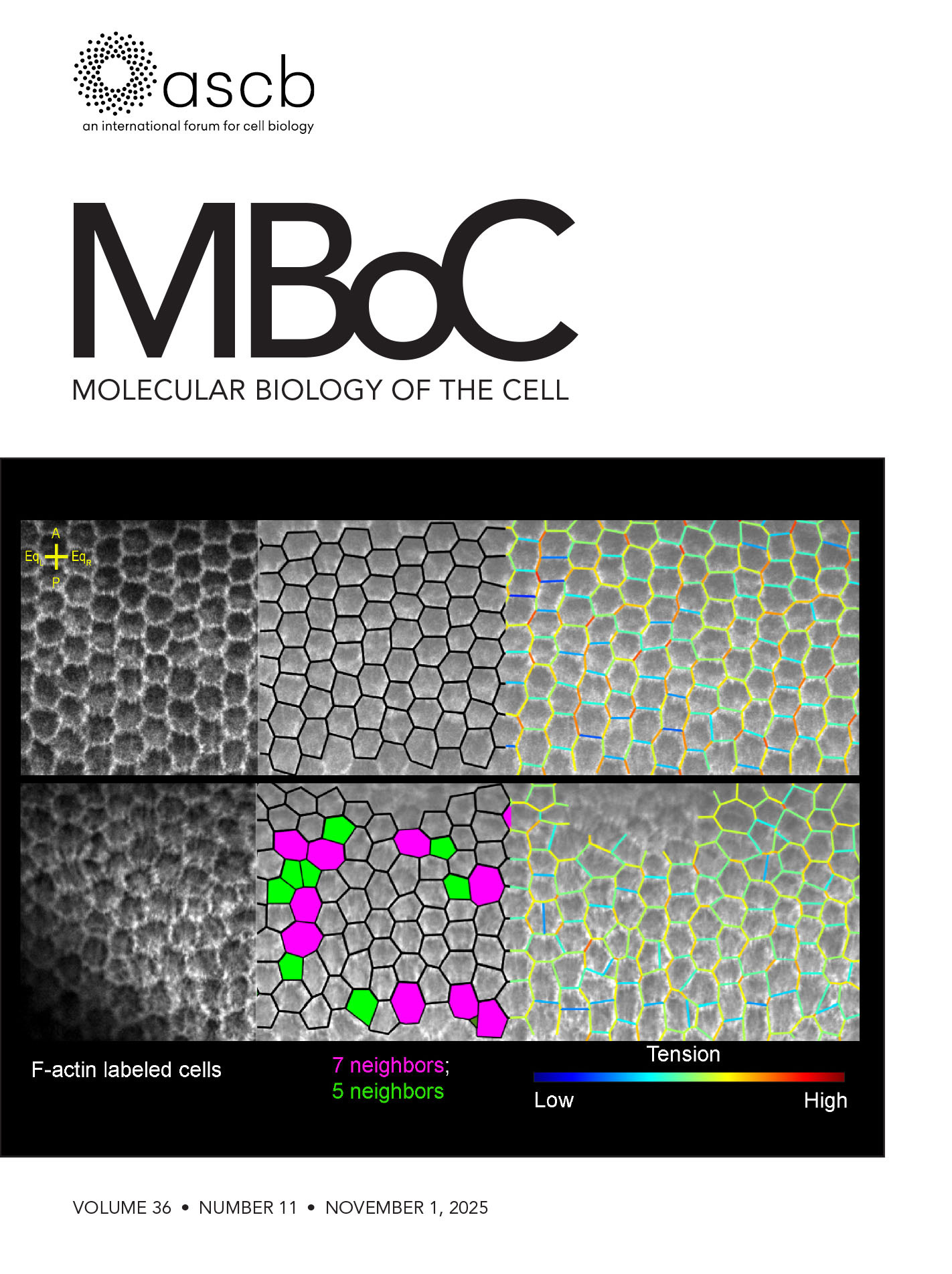
Nov 2025
Advertisement




Abstract
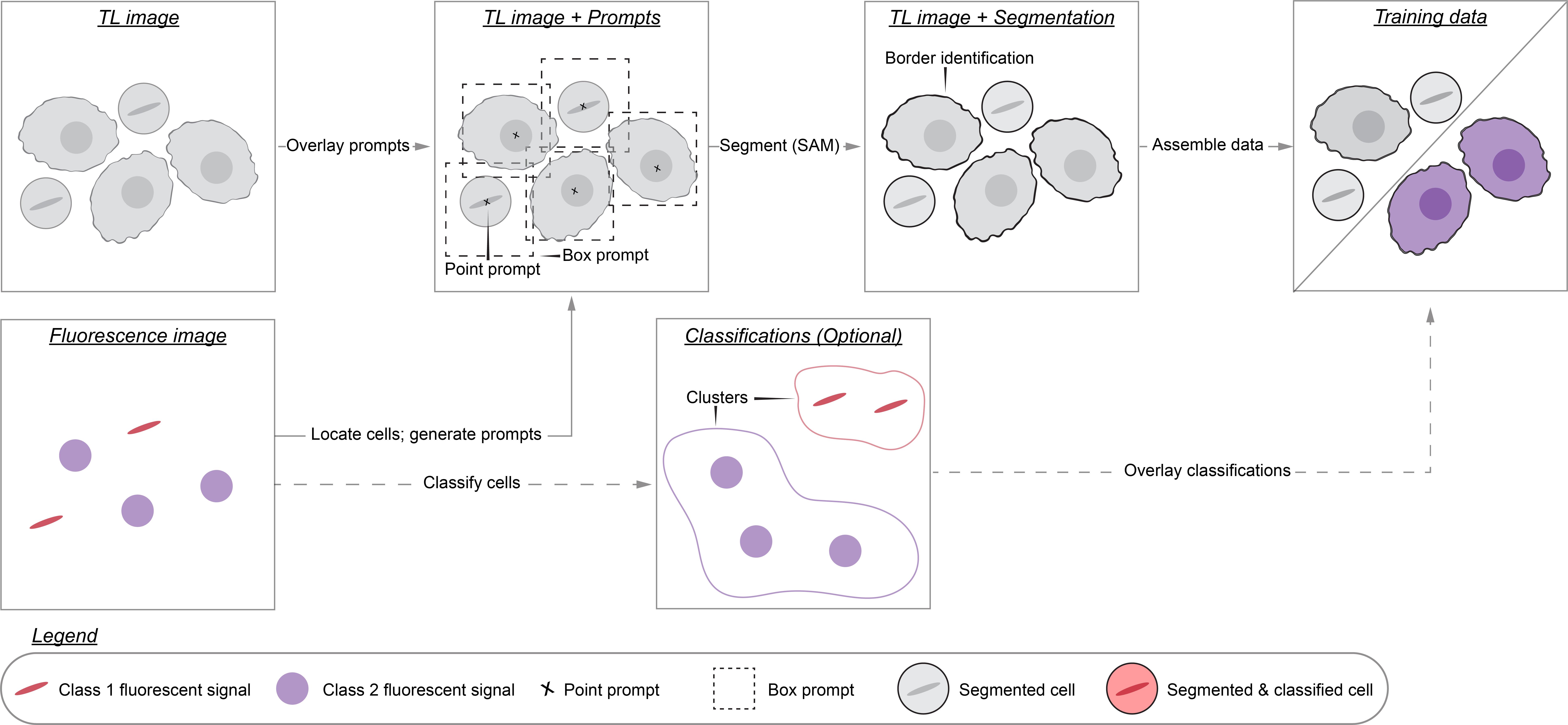
The deep learning revolution has accelerated discovery in cell biology by allowing researchers to outsource their microscopy analyses to a new class of tools called cell segmentation models. The performance of these models, however, is often constrained by the limited availability of annotated data for them to train on. This limitation is a consequence of the time cost associated with annotating training data by hand. To address this bottleneck, we developed Cell-APP (cellular annotation and perception pipeline), a tool that automates the annotation of high-quality training data for transmitted-light (TL) cell segmentation. Cell-APP uses two inputs—paired TL and fluorescence images—and operates in two main steps. First, it extracts each cell’s location from the fluorescence images. Then, it provides these locations to the promptable deep learning model μSAM, which generates cell masks in the TL images. Users may also employ Cell-APP to classify each annotated cell; in this case, Cell-APP extracts user-specified, single-cell features from the fluorescence images, which can then be used for unsupervised classification. These annotations and optional classifications comprise training data for cell segmentation model development. Here, we provide a step-by-step protocol for using Cell-APP to annotate training data and train custom cell segmentation models. This protocol has been used to train deep learning models that simultaneously segment and assign cell-cycle labels to HeLa, U2OS, HT1080, and RPE-1 cells.
Key features
• Cell-APP automates the annotation of training data for transmitted-light cell segmentation models.
• Cell-APP requires paired transmitted-light and fluorescence images. Each cell in the fluorescence image must have a whole and spatially distinct signal.
• Cell-APP dataset-trained models segment time-lapse movies of HeLa, U2OS, HT1080, and RPE-1 cells with the spatial and temporal consistency needed for long-time tracking with Trackpy.
• Cell-APP can be downloaded from the Python Package Index and comes with a graphical user interface to aid dataset generation.
Keywords: Cell segmentation (细胞分割) Dataset annotation (数据集标注)
Computer vision (计算机视觉)
Deep learning (深度学习)
High-throughput microscopy (高通量显微成像)
Dataset annotation (数据集标注)
Computer vision (计算机视觉)
Deep learning (深度学习)
High-throughput microscopy (高通量显微成像)
Graphical overview
Background
High-throughput microscopy enables researchers to rapidly collect data on thousands of cells. Analyzing these data, however, can be prohibitively time-consuming. For this reason, researchers have developed many algorithms that partially automate microscopy analysis by segmenting individual cells within images—a process known as instance segmentation. Of these algorithms, deep learning models such as Cell-Pose, StarDist, LIVECell, and EVICAN comprise the current state-of-the-art [1–6]. These ready-to-use models, however, may underperform when applied to images that differ significantly from those on which they were trained. This is a common situation: numerous different imaging modalities and cell lines are used in research labs, yet only a fraction of these have been used to train existing models. This limited scope stems from the way training datasets are typically created: hand annotation, a prohibitively time-consuming process that requires researchers to manually outline each cell in the dataset. We therefore need more efficient dataset generation methods in order to build segmentation models that perform robustly across the range of used cell lines and imaging conditions.
To this aim, we developed Cell-APP (cellular annotation and perception pipeline), a tool that automatically generates high-quality datasets for the training of deep learning–based models that segment adherent cells in transmitted-light (TL) microscopy images. With Cell-APP-generated datasets, users can build models tailored to their cell lines and imaging conditions. The tool requires only two inputs—paired TL and fluorescence images—and these inputs have a minimal set of requirements. First, signals in the fluorescence images must correspond to individual cells and be spatially separate from one another; this is because the fluorescence images are used to locate cells. Second, cells in the TL image must be non-overlapping and have discernible boundaries; if they do not, Cell-APP may produce erroneous cell outlines (see Figure 1 for example inputs and outputs). Finally, Cell-APP includes an optional classification module that uses fluorescence-derived features to label cells. These fluorescence-based classes must correspond to visual differences in the TL image; if they do not, the trained cell segmentation models may not learn to classify cells accurately (see Figure S1 for the full process diagram).
Here, we provide a step-by-step guide for using Cell-APP to build custom cell segmentation models. The guide covers (A) acquiring, or repurposing, microscopy data for Cell-APP, (B–E) generating training and testing datasets, (F) training Detectron2 models on the generated datasets, and (G) results interpretation, evaluating the generated datasets and trained models.
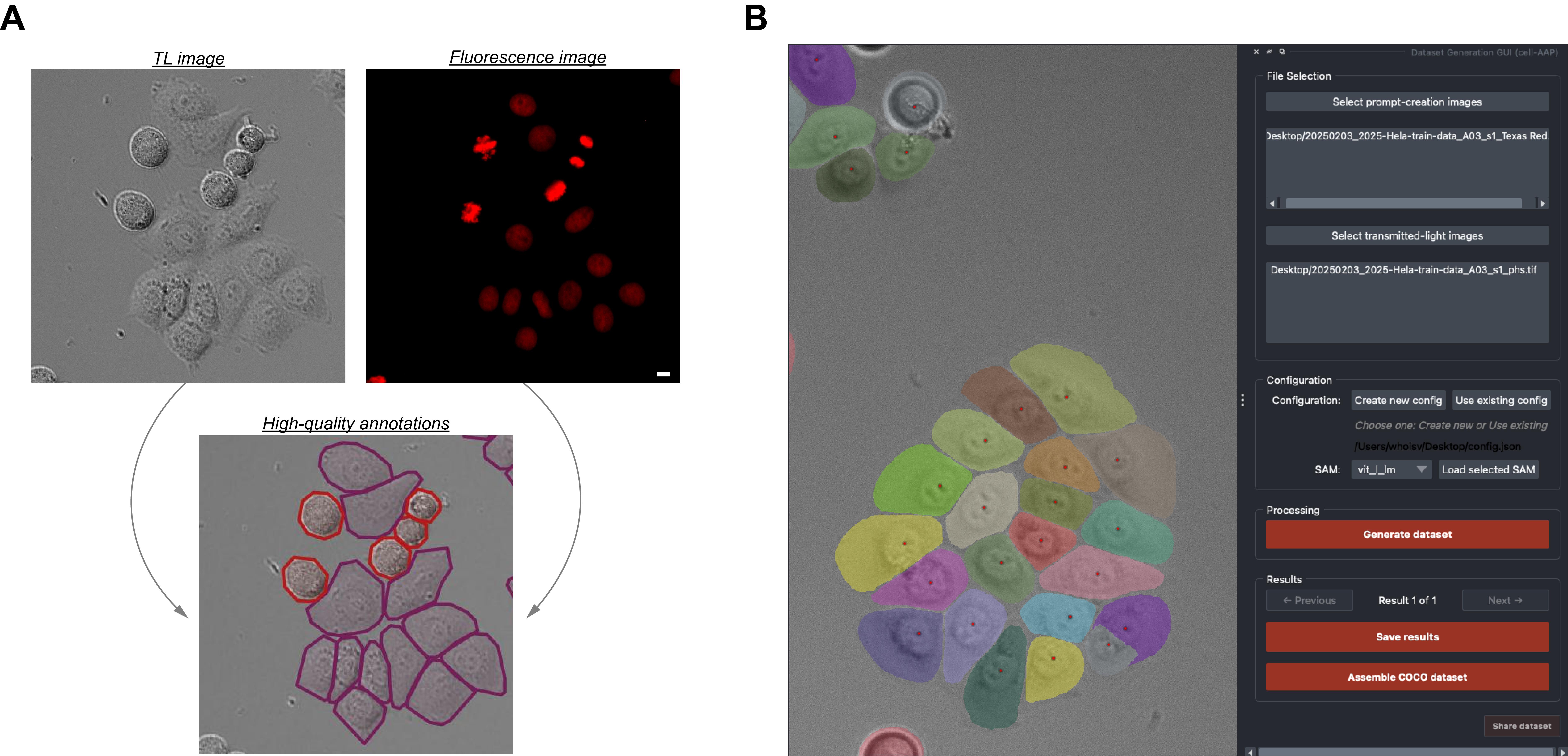
Figure 1. Input-output and Cell-APP graphical user interface examples. (A) Inputs (top row) and outputs (bottom row) that satisfy the described input requirements (see General note 1) and output standards (see Results Interpretation). (B) Example of the final segmentation results displayed within the Cell-APP graphical user interface. Scale bar = 10 μm.
Materials and reagents
Biological materials
1. One or more adherent, monolayered, metazoan cell lines (mycoplasma-free; expressing fluorescent protein or compatible with fluorescent dye for prompt creation). We used HeLa A12, hTERT-RPE1, U2OS, and HT1080 cell lines expressing Histone 2B-mCherry. We could have achieved equivalent results using unedited cell lines stained with SiR DNA dye (Cytochrome)
Reagents
1. Fetal bovine serum (Gibco, catalog number: 12657-029)
2. Penicillin–streptomycin solution (Thermo Fisher Scientific, catalog number: 15140122, or equivalent)
3. FluoroBriteTM DMEM (Thermo Fisher Scientific, Gibco, catalog number: A1896702)
4. DMEM (Thermo Fisher Scientific, Gibco, catalog number: 11960044)
5. HEPES (Thermo Fisher Scientific, Gibco, catalog number: 15630130)
6. GlutaMAXTM supplement (Thermo Fisher Scientific, Gibco, catalog number: 35050061)
7. (Optional) SiR-DNA (Spirochrome, Cytoskeleton, catalog number: CY-SC007)
8. (Optional) GSK923295 (Fisher Scientific, catalog number: 50-000-02189)
9. (Optional) Thymidine (Sigma-Aldrich, catalog number: T9250)
Solutions
1. Supplemented DMEM/FluoroBriteTM DMEM (see Recipes)
Recipes
1. Supplemented DMEM/FluoroBriteTM DMEM
| Reagent | Final concentration | Quantity or volume |
|---|---|---|
| DMEM or FluoroBriteTM | n/a | 500 mL |
| Fetal bovine serum | ~10% | 50 mL |
| 1 M HEPES | ~25 mM | 12.5 mL |
| GlutaMAXTM | ~1% | 5 mL |
| Penicillin–streptomycin solution | ~1% | 5 mL |
Laboratory supplies
1. 5 mL serological pipettes (Thermo Fisher Scientific, catalog number: 170355N)
2. 10 mL serological pipettes (Thermo Fisher Scientific, catalog number: 170356N)
3. BasixTM polypropylene conical centrifuge tubes (Fisher Scientific, catalog number: 14-955-237)
4. EppendorfTM safe-lock tubes 1.5 mL (microtube) (Fisher Scientific, catalog number: E0030123611)
5. CorningTM PrimariaTM tissue culture dishes (Fisher Scientific, catalog number: 08-772-4A)
6. μ-plate 96-well square (Ibidi, catalog number: 89626)
Equipment
1. For dataset generation: Computer with sufficient (C11) RAM or access to a high-performance computing cluster
2. (Optional) For model training: NVIDIA GPU-enabled computer or access to a high-performance computing cluster
3. (Optional) For data acquisition: Fluorescence-equipped microscope; we used an ImageXpress Nano Automated Imaging System equipped with a SOLA Light Engine and a 20×, 0.46 NA objective
Software and datasets
| Type | Software/dataset/resource | Version | Date | License | Access |
|---|---|---|---|---|---|
| Software 1 | cell-AAP | 1.0.7 | 1/7/2025 | MIT | Free |
| Software 2 | Detectron 2 | 0.6 | 11/15/2021 | Apache-2.0 | Free |
| Software 3 | Python | 3.11 | 10/24/2022 | PSFL | Free |
| Software 4 | Miniconda | Depends on the user’s computer | n/a | MEULA | Free |
Procedure
登录/注册后免费查看全文
文章信息
稿件历史记录
提交日期: Nov 3, 2025
接收日期: Jan 15, 2026
在线发布日期: Feb 5, 2026
出版日期: Feb 20, 2026
版权信息
© 2026 The Author(s); This is an open access article under the CC BY-NC license (https://creativecommons.org/licenses/by-nc/4.0/).
如何引用
Readers should cite both the Bio-protocol article and the original research article where this protocol was used:
- Virdi, A. J. and Joglekar, A. P. (2026). How to Train Custom Cell Segmentation Models Using Cell-APP. Bio-protocol 16(4): e5618. DOI: 10.21769/BioProtoc.5618.
- Virdi, A. J. and Joglekar, A. P. (2025). Cell-APP: A generalizable method for cell annotation and cell-segmentation model training. Mol Biol Cell. 36(11): ee25–02–0076. https://doi.org/10.1091/mbc.e25-02-0076

 Download Citation in RIS Format
分类
生物信息学与计算生物学
细胞生物学 > 细胞成像 > 活细胞成像
细胞生物学 > 单细胞分析
您对这篇实验方案有问题吗?
在此处发布您的问题,我们将邀请本文作者来回答。同时,我们会将您的问题发布到Bio-protocol Exchange,以便寻求社区成员的帮助。
 发布问题
发布问题


